Use the Monitoring tool to examine a crawler’s status.
URLs can have one of three crawl statuses:
-
Success
-
Ignored (skipped)
URLs didn’t match any of your configuration’s
pathsToMatch
or they did match one of your exclusionPatterns
-
Failed
Each failed URL fits into one of these categories:
- Fetching. URLs that failed when accessing your site
- Extraction. URLs that failed when attempting to extract data from your site.
- Indexing. URLs that weren’t sent to Algolia.
-
Internal
An internal crawler error
Failed URL details
To get more details about a failed URL:
- Open the URL inspector
- Click Test URL to open the URL Tester.
- Click Run Test.
In the following example, the URL failed because the record was too big:
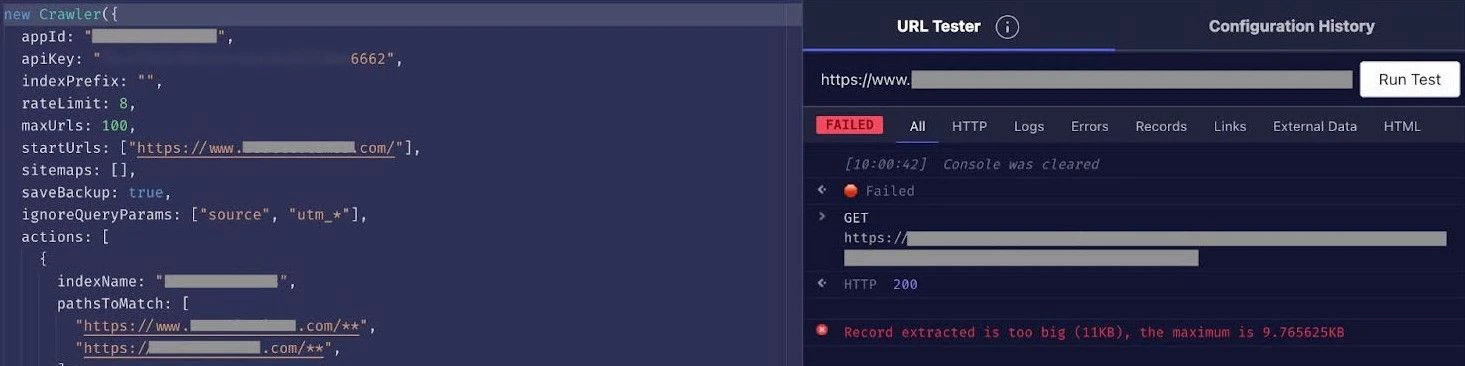 For more information, see:
Last modified on June 19, 2026

