

Prefer using the Autocomplete widget from InstantSearch instead of the standalone Autocomplete library.
It integrates more closely with your search experience.
For more information,
see the API reference for InstantSearch.js or
React InstantSearch.
insights parameter.
Sending events lets Algolia recommend products,
adjust the ranking dynamically (Dynamic Re-Ranking and Personalization),
and lets you get better insights with Analytics and A/B Testing.
You can see a complete implementation in the Autocomplete playground.
Before you begin
Before you can send events, you need to add the Autocomplete library to your project. For more information, see Get started with Autocomplete.Create an Autocomplete instance
Get started by creating a new fileindex.js.
Add the following code to create an Autocomplete instance that includes results from an Algolia and Query Suggestions.
id autocomplete.
To use a different selector, adjust the container parameter.
The openOnFocus parameter ensures that the Autocomplete menu appears as soon as users focus the input.
This searches an Algolia index of ecommerce products using the getAlgoliaResults function.
Enable the insights option
To automatically send events,
turn the insights option to true in your autocomplete instance.
JavaScript
setUserToken.
The search-insights library can create anonymous user tokens and store them in cookie.
To use cookie-based anonymous tokens,
initialize the library with useCookie set to true:
JavaScript
search-insights library (earlier than version 2.0),
cookie-based anonymous tokens are on by default.
Manage the Insights library
Autocomplete loads thesearch-insights library for you from jsDelivr.
You don’t need to install it or set it up yourself.
If you’re using a Content Security Policy to protect your site and you want to let Autocomplete load search-insights for you,
make sure to add https://cdn.jsdelivr.net in your list of trusted sources for JavaScript.
search-insights,
you can add it to your project:
Autocomplete doesn’t load search-insights when it detects it on the page.
Default events
After enabling theinsights option,
Autocomplete automatically sends the following events:
By default, Autocomplete doesn’t send any conversion events.
You can send events from templates manually.
Customize events
You can customize the Insights plugin by using one of these hooks: For example, you might want to use a differenteventName.
For more information, see the examples in the createAlgoliaInsightsPlugin documentation.
Send events from templates
By default, Autocomplete doesn’t send any conversion events. If your templates include calls to action, such as an Add to cart button, you can track interactions with them as conversion events.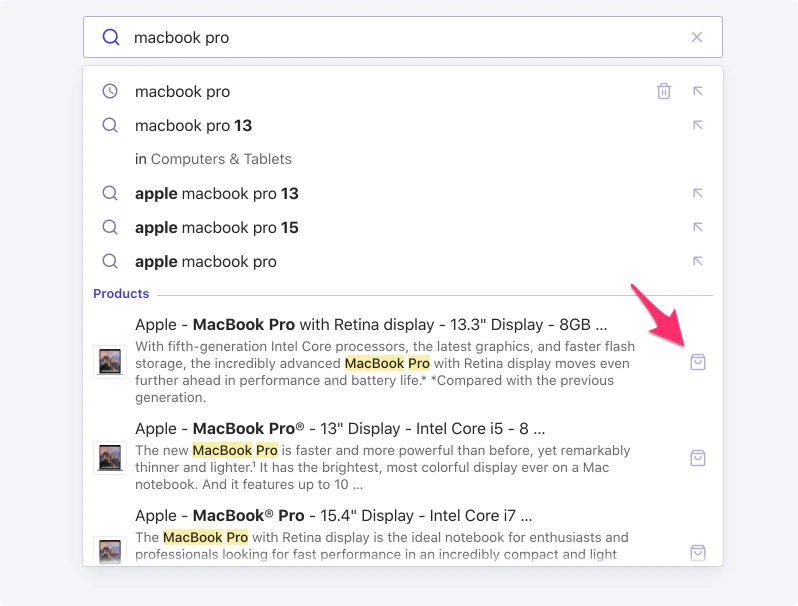
convertedObjectIDsAfterSearch method:
Add-to-cart events
When your users add an item to their cart, send a specialconversion event with the addToCart subtype.
JavaScript
Fields representing monetary values accept both numbers and strings, in major currency units (for example,
5.45 or '5.45').
To prevent floating-point math issues, use strings, especially if you’re performing calculations.Purchase events
When your users purchase an item, send a specialconversion event with the purchase subtype.
JavaScript
Fields representing monetary values accept both numbers and strings, in major currency units (for example,
5.45 or '5.45').
To prevent floating-point math issues, use strings, especially if you’re performing calculations.