

This is a beta feature according to Algolia’s Terms of Service (“Beta Services”).
How personalized recommendations work
Personalized recommendations use the same Recommend models, but they incorporate user affinities to tailor the recommendations to individual users. The recommendations are re-ranked based on users’ affinities, which are derived from their interactions and preferences. Each Recommend request must include theuserToken.
Without it, Recommend doesn’t have any affinities to re-rank with and returns the model’s default results.
Before you begin
This feature isn’t available on every plan.
Refer to your pricing plan to see if it’s included.
- Set up your Personalization configuration and confirm that user affinities are being computed.
- Check that you send a
userTokenwith your events, and that each user has their own token.
Enable personalized recommendations
- Go to the Algolia dashboard and select your Algolia .
- On the left sidebar, select Recommend.
- Select one of the supported models and click Start using.
-
On the model’s configuration page, turn on Personalization.
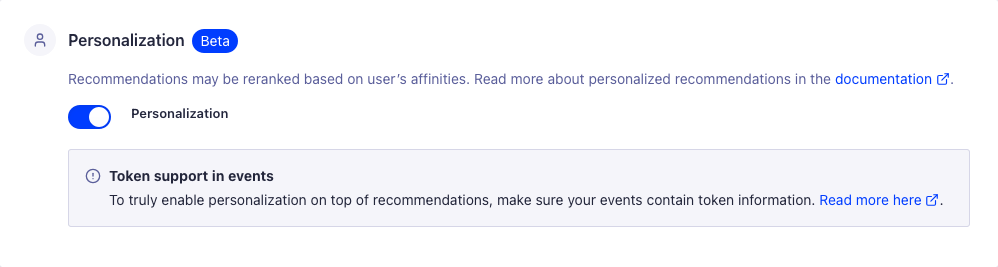
Send a user token with your requests
Recommend inheritsenablePersonalization from the Personalization toggle you turned on for this model in Enable personalized recommendations, so you only need to send it to override that setting for a single request.
If you use InstantSearch with the insights middleware, the Recommend widgets send the user token for you.
You can also set userToken in the widget’s queryParameters:
JavaScript
userToken to the queryParameters of each request:
JavaScript
getUserToken to get the anonymous user token, instead of generating your own.
Personalize fallback results
When using a fallback query, the results aren’t personalized by default. To personalize fallback results, setenablePersonalization: true in fallbackParameters:
JavaScript
userToken into fallbackParameters for you.
enablePersonalization needs to be set explicitly in fallbackParameters.
If you use the Recommend API client or an older version of InstantSearch, set both userToken and enablePersonalization in fallbackParameters.
See also
- Recommended for you, a model that’s personalized by design
- Set up Recommend