

This feature isn’t available on every plan.
Refer to your pricing plan to see if it’s included.
Prepare to A/B test Advanced Personalization
Before setting up an A/B test, make sure you have configured Advanced Personalization on the dashboard: Alternatively, you can use the Advanced Personalization API to configure Advanced Personalization.Launch an A/B test
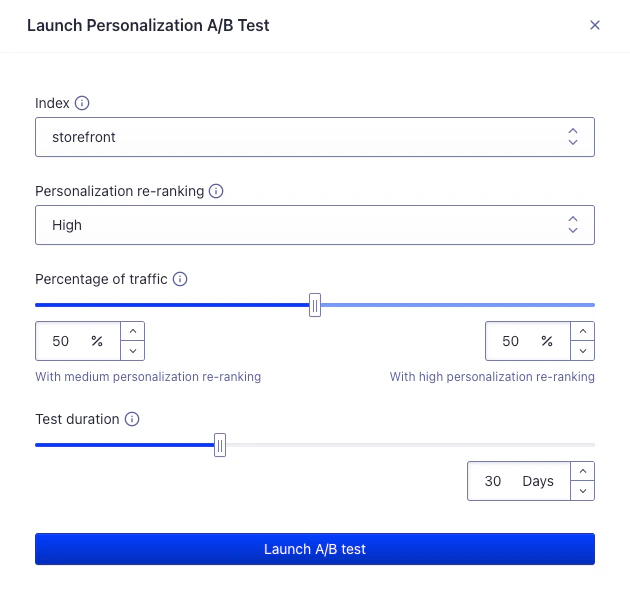
Dashboard interface for launching an A/B test
- Select the on which you want to A/B test personalization. This is the index where you compare search results. You can select only indices that you’ve configured for Advanced Personalization.
- Define the personalization re-ranking level for the A/B test. This is the level of personalization you want to A/B test against the personalization re-ranking from the configuration.
- Set the percentage of traffic. This is the share of searches that the personalization re-ranking level boosts.
- Set the duration of the test. This is the longest time the A/B test runs after you start it. For the best results, set a duration long enough for high-confidence results.
- Launch A/B test. This triggers the launch of the A/B test. Your users now receive personalized search results based on your setup.
View the results of an A/B test
You can view the results of all Advanced Personalization A/B tests in the A/B testing dashboard.A/B test real-time personalization
You can also use A/B testing to determine if real-time personalization is the right option for your application. After testing historical personalization, you can test the impact of real-time personalization to see if this approach leads to more engagement. You can measure the impact of real-time personalization in two ways.- If you aren’t yet using historical personalization, you can measure the combined impact of real-time personalization and historical personalization.
- If you are already using historical personalization, stop using it for all users. Set personalization re-ranking to
none, then measure the combined impact of real-time personalization and no personalization.
Measure combined impact of real-time and historical personalization
- Ensure that you have setup real-time personalization in the Advanced Personalization dashboard.
- Repeat the Launch an A/B test steps.