

This is a beta feature according to Algolia’s Terms of Service (“Beta Services”).
Before you begin
To use B2B indexing, your store must:- Have Shopify B2B set up with at least one company location and catalog.
- Have product indexing enabled in the Algolia AI Search & Discovery app.
- Use the Algolia app blocks in your theme. B2B indexing doesn’t support legacy theme integrations.
Turn on B2B indexing
- In your Shopify admin, open the Algolia AI Search & Discovery app.
- Go to the Indexing tab.
-
In the Shopify B2B section, select Include B2B company location data.
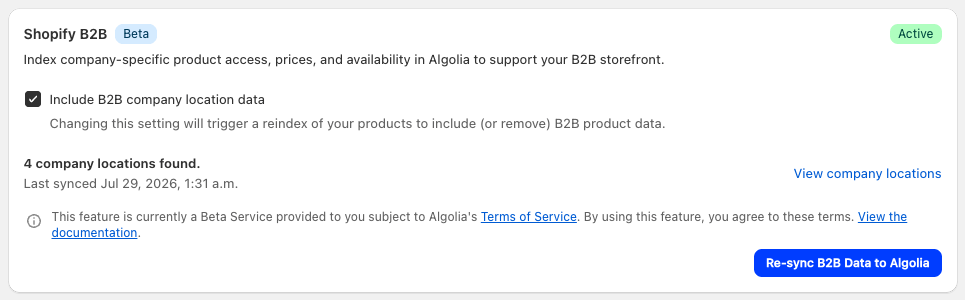
- In the Enable B2B indexing? dialog, click Enable and reindex. The app fetches your B2B catalogs and company locations from Shopify and starts a full product reindex.
- When the reindex is complete, check your product records for the B2B attributes described in Schema.
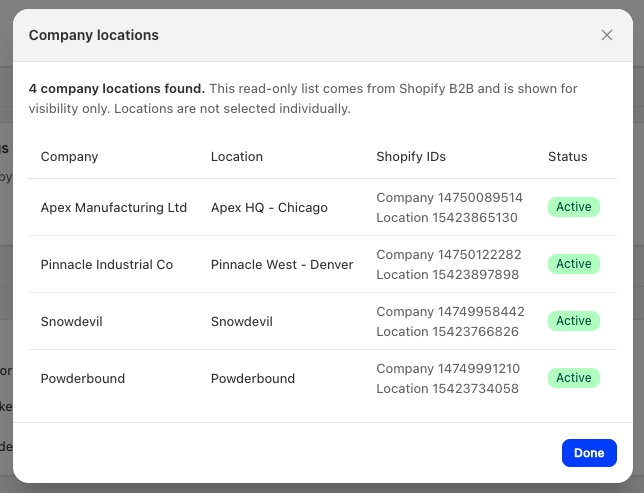
How B2B search works
When B2B customers log in to your storefront, the Autocomplete, InstantSearch, and Recommend app blocks detect their company location. Search results then only include products from that location’s catalogs, with the location’s own B2B pricing. This happens automatically. If a product doesn’t have a B2B price for the customer’s location, the app blocks fall back to displaying the retail price.Currency
B2B prices display in the currency of the location’s price list, even when the customer browses your store in a different market or currency. This matches Shopify B2B checkout, which always charges in the price list currency.Price sorting
Sorting and filtering by price use the retail price stored in each record. If a company location’s pricing is a single percentage adjustment, the retail price order matches the B2B price order, and price sorting works as usual. For locations with fixed prices or mixed adjustments, the app hides price sort options and price filters from those B2B customers to prevent incorrectly ordered results.Keep B2B data in sync
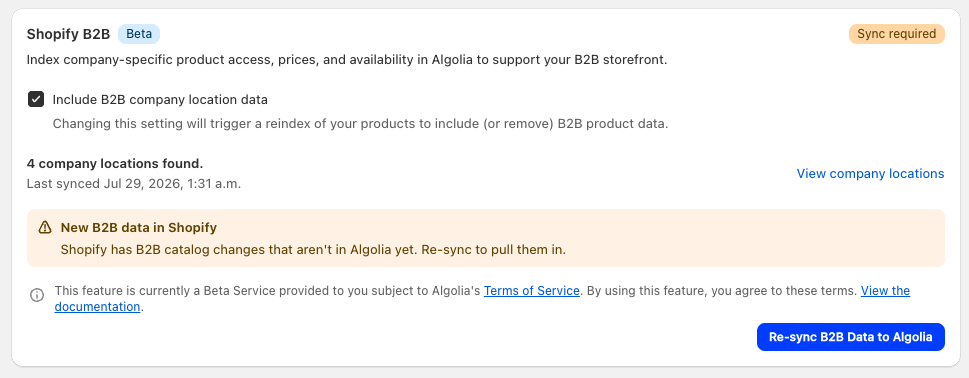
Shopify doesn’t send notifications when you change catalogs or price lists. Instead, the app re-syncs your catalog and company location data once a day, and checks for new changes when you open the Indexing tab. The Shopify B2B section shows the result:- Sync required: your catalogs or company locations changed in Shopify since the last sync. Click Re-sync B2B Data to Algolia to update the app’s catalog data.
- Reindex required: synced changes affect your indexed records. Click Reindex products to update them.
Schema
B2B indexing adds two attributes to your existing product . It doesn’t create new indices.clids: the IDs of the company locations that can see the product. Algolia uses this attribute for filtering. It’s never returned in search results._bp: the B2B pricing for each company location, keyed byc_COMPANY_LOCATION_ID.
JSON
_bp entry can include:
A missing
_bp entry means the location doesn’t have a B2B price for that product,
and the widgets fall back to the retail price.
If you show products instead of variants,
the product record’s _bp entry contains the lowest variant price for each location,
its volume_pricing is the lowest volume price across all variants,
and each nested variant carries its own _bp.
Algolia protects B2B attributes at search time:
logged-in B2B customers can only retrieve the _bp entry for their own company location,
and retail visitors can’t retrieve B2B data at all.
Limitations
- B2B visibility and pricing apply to product records only. Collections, pages, and blog posts don’t include B2B data.
- Keep B2B indexing to about 50 company locations. The integration doesn’t enforce a limit, but record size grows with each company location that prices a product, and stores with many locations can exceed the Algolia record size limit during indexing.
- Records include only one volume pricing tier: the price at the highest quantity tier. To display the full tier table on product pages, fetch it from Shopify’s Storefront API.