

Autocomplete, InstantSearch, and Recommend in the Algolia app blocks now support version 5 of the Algolia API client.
Most stores only need to switch the search client version setting to Version 5.
If you use custom storefront JavaScript, follow the version 5 upgrade guide.
Support for version 4 ends on August 14, 2026.
How to index metafields
To index Shopify metafields as Algolia searchable attributes, follow these steps:- In your Shopify admin, go to the Algolia AI Search & Discovery app and open the Indexing tab.
- Go to the Metafields Indexing section.
- Enter a title, namespace, and key for the metafield you want to add. You can find this information in the app you use to manage your metafields.
- Optional for products: select Use as facet if you want to use this metafield for faceting or filtering.
- Optional: convert the metafield type to a number, a string array, a JSON-encoded field, or a metaobject reference.
- Click Add.
- If you’re done adding metafields, click Save.
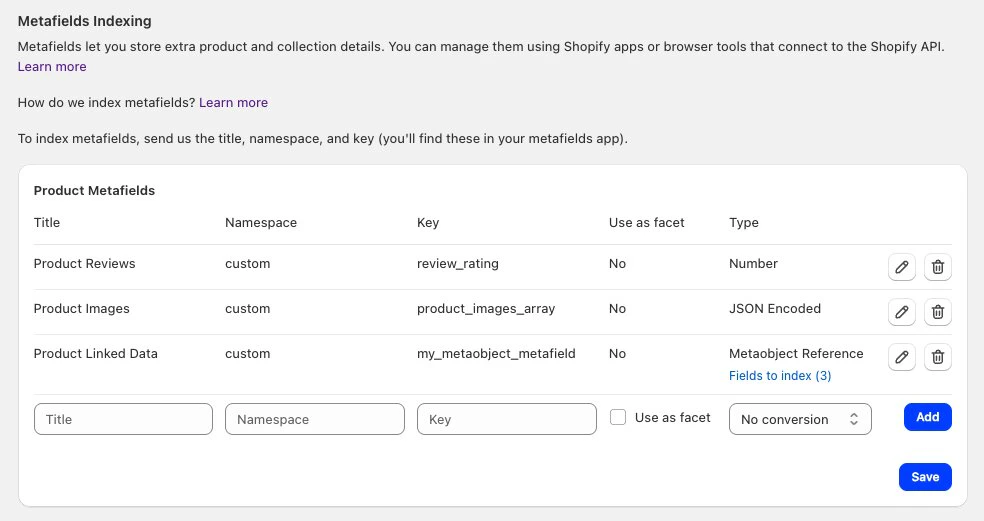
Metafields as facets
For your products, you can select metafields as facets. If you select the Use as facet option when adding or editing a metafield, the metafield is initially inactive. Inactive facets aren’t shown in your in the Algolia dashboard. To activate the , go to the Search Options tab, click InstantSearch - Results page powered by Algolia > Customize and configure your facets.Type conversion
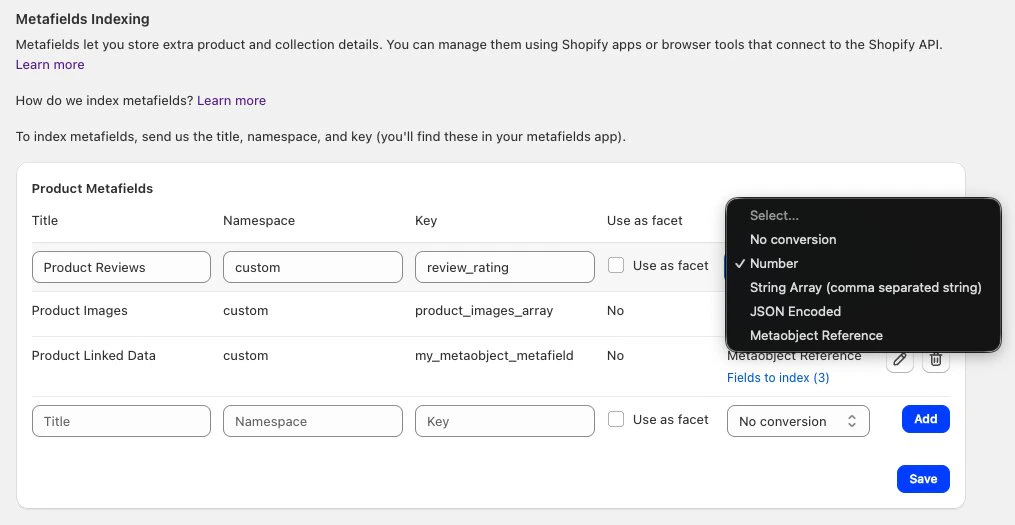
integer or string types.
For your Algolia index, you can convert them to the following types:
Number
Converts strings to:- Integers:
"100" => 100 - Decimals:
"1.2" => 1.2
String array
Converts a string to an array of strings, split on commas.- To include commas in a string, wrap the string in quotes:
abc, "def,ghi" - To include quotes in a string, wrap the string in quotes and escape the quotes:
abc, "def\"ghi" - To include backslashes in a string, wrap the string in quotes and escape the backslashes:
abc, "def\\ghi"
JSON-encoded
Decode a JSON-encoded string or a JSON metafield. Transform this string:JSON
Metaobject reference
Index the fields of a Shopify metaobject that’s referenced by a metafield. This works with both single metaobject reference and list metaobject reference metafield types. When you select Metaobject Reference as the type, a Fields to index link appears. Click this link to open a modal where you can choose which fields from the metaobject definition to include in your Algolia records. By default, all fields are selected. To index metaobject fields:- Add a metafield with the namespace and key of a metafield that references a metaobject.
- In the Type drop-down menu, select Metaobject Reference.
- Click Fields to index to open the field selection modal.
- Select the metaobject fields you want to include in your Algolia records. At least one field must be selected.
- Click Confirm, then click Save.
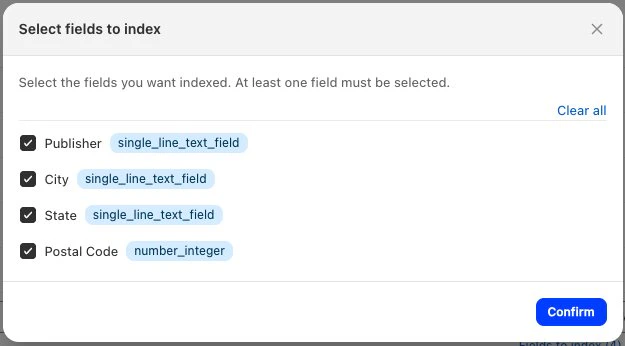
The available fields are fetched from your Shopify store’s metaobject definition.
If no fields appear, verify that the namespace and key of the metafield are correct,
and that the metafield references a valid metaobject definition.
Schema
The Algolia AI Search & Discovery app adds Shopify metafields to your as themeta searchableAttributes.
For example, a record with three meta fields:
colors.main, colors.secondary, and contact.partner.
JSON
meta.namespace.key, such as meta.colors.primary.
Product and variant metafields
If a variant has metafields, its values override the metafields of its parent product.Updating a product metafield will trigger a product update webhook but updating a variant-level metafield won’t.
Use the Sync with Algolia feature to trigger real-time updates and reflect metafield changes.
Multilingual support
Some Shopify apps that help with translations store their translated data in metafields. The Algolia AI Search & Discovery app can index this translated data. To add support for several languages:- Add the required translated data within metafields associated with the product.
- Index those metafields.
- Optional: depending on the user’s chosen language, display this data by modifying the relevant product template (InstantSearch and Autocomplete).
Metafield translations with Shopify Markets
By default, when using markets indexing, metafields aren’t translated. Only the following attributes are translated and indexed by default:titlehandlebody_htmlproduct_type
Constraints
- Rate limiting. Metafield translations make one API request per field. If you have a large Shopify store, check Shopify’s rate limits.