

Autocomplete, InstantSearch, and Recommend in the Algolia app blocks now support version 5 of the Algolia API client.
Most stores only need to switch the search client version setting to Version 5.
If you use custom storefront JavaScript, follow the version 5 upgrade guide.
Support for version 4 ends on August 14, 2026.
This is a beta feature according to Algolia’s Terms of Service (“Beta Services”).
Turn on inventory location indexing
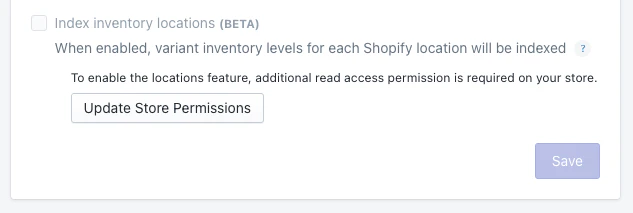
Make sure you set up your store with more than one location on Shopify. This results in extra API requests to Shopify. These extra requests can delay indexing if Shopify imposes rate limits. To turn on inventory location indexing:- In your Shopify admin, open the Algolia AI Search & Discovery app.
- Go to the Indexing tab.
-
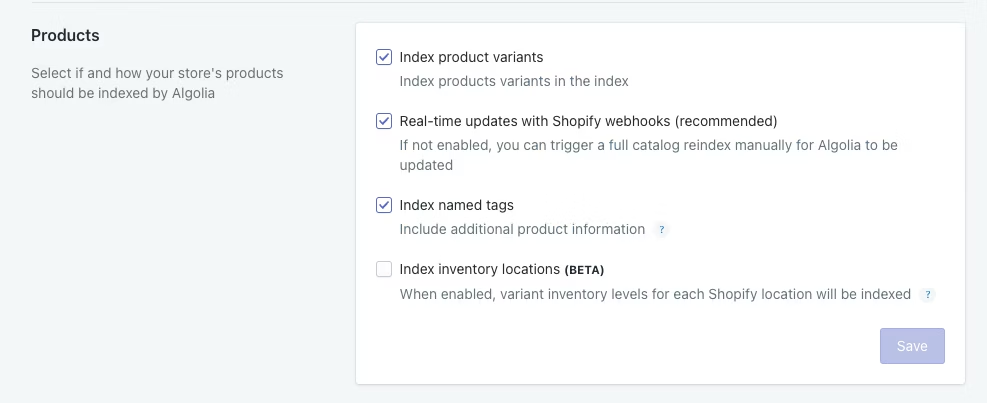
In the Products section, select Index inventory locations (BETA) and click Save.
This triggers a product reindexing.
-
When the reindex is complete, check your products records for the new
locations_inventoryattribute.
Schema
Inventory locations are individual key-value pairs in thelocations_inventory attribute of each product record.
The key is the location ID, auto-generated by Shopify.
The value is the inventory quantity at that location.
The following example shows the location_inventory attribute with three locations:
JavaScript