

Autocomplete, InstantSearch, and Recommend in the Algolia app blocks now support version 5 of the Algolia API client.
Most stores only need to switch the search client version setting to Version 5.
If you use custom storefront JavaScript, follow the version 5 upgrade guide.
Support for version 4 ends on August 14, 2026.
Products and variants
Algolia stores variants, not products, in anPREFIX_products.
The default prefix is shopify.
Variants are stored as independent .
This page describes the default variant-level indexing mode.
If your store uses product-level indexing,
Algolia stores one record per product instead, with the variants nested inside it.
For products without variants,
the product attributes are first transformed into a schema that parallels the structure of the variant’s schema and then uploaded.
The Algolia AI Search & Discovery app only supports indexing products in the “Online Store” sales channel.
Product variant schema
Algolia stores your product variants in the following format:JavaScript
image attribute uses the variant’s image if it exists,
otherwise it uses the first image of the associated product.
Retrievable attributes
By default, when performing a search, users can view results with the matching records and records data for each indexed attribute. This process occurs regardless of whether you display the information in your user interface. This approach lets you fully take advantage of Algolia’s ready-to-use Autocomplete, InstantSearch, and Recommend features, and gives you the necessary resources to further customize the experience. For example, you can use this information to create experiences that encourage your users to “buy now” when inventory is below a certain amount. If you want to turn off public visibility of specific attributes, you can make them unretrievable. The quickest way to configure this is by going to Algolia’s dashboard, under Search > Configuration > Search Behavior > Retrieved Attributes > Unretrievable attributes > Add an attribute. You can also access the configuration in app in one of the following ways:- Quickstart Checklist. For all new users, this is done in step 4 of the checklist. Existing users can access this by clicking Quick Start in the Algolia app.
- App Admin. On the Search Options tab, under Additional settings > Retrieved attributes.
Example: Setting the attribute “vendor” as unretrievable
| Retrievable | Unretrievable |
|---|---|
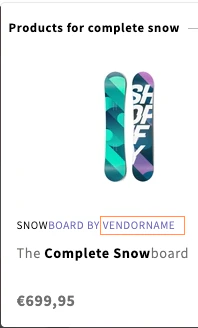 | 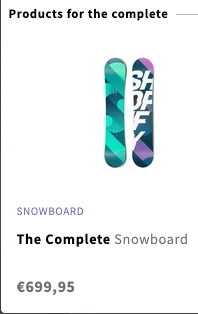 |
If vendor is retrievable, the attribute is included in the results display. | If vendor unretrievable, it isn’t displayed and not included in the search results. |
-
Default attributes set to unretrievable
Algolia’s Shopify integration automatically sets certain attributes to unretrievable,
such as
recently_ordered_count,variants_inventory_count,locations_inventory, andinventory_quantity. - Facets If an attribute is set as both an unretrievable and as a facet, that attribute’s data for the matching record isn’t retrieved. However, facet information, such as counts, are retrieved.
- Additional indices The preceding attributes only apply to product indices. For other indices, such as pages, blogs, or collections, review their attributes and mark them as unretrievable in the Algolia dashboard.
Recently ordered count
The recently ordered count attribute represents all orders since the last full reindex. Initially, it doesn’t exist when the index is first created. It gets added when you sell products. For example, if a shopper buys two blue t-shirts in size S, the value of this attribute increases by two. The recently ordered count attribute is used for the Most Popular sort order.The
recently_ordered_count attribute is reset during a full reindex.
Therefore, it’s a count of all orders since the last reindex, not since the beginning.
The recently_ordered_count attribute is preserved during real-time indexing.Searchable attributes for products
By default, these attributes are searchable. They’re ranked in order of relevance. For example, results with a match in thevendor attribute rank before results with a match in the title attribute:
unordered(vendor)unordered(title)unordered(variant_title)product_typeunordered(tags)unordered(handle)skubarcodeunordered(body_html_safe)
Show products instead of variants
To only show the most relevant variant instead of all variants in your search results:- Go to the Shopify admin and go to the Algolia AI Search & Discovery app.
- On the Search options tab, in the Variants section, select Show products instead of variants.
Remove products from search results
Products are indexed if they have the following properties:- “Active” status and published to the “Online Store” sales channel
- No publishing date in the future
- No
algolia-ignoretag in their list of tags - No
[hidden]in their title
- Add
algolia-ignoreto the product’s list of tags - Add
[hidden]to its title - Set the status to “Draft”
- Archive the product
Remove variants from search results
To remove a variant from the search results add[hidden] to the variant’s name.
The position of the string [hidden] in the title doesn’t matter.
For example, if you want to hide a variant “blue” from the search results,
change its title to blue [hidden] or [hidden] blue.
Collections
If you enabled Collection pages, Algolia stores your collections in a dedicated indexPREFIX_collections.
The default prefix is shopify.
The relationship between products and collections is stored in the product records,
in the collection_ids and collections attributes.
The Algolia AI Search & Discovery app only supports indexing collections in the “Online Store” sales channel.
Collections schema
Algolia stores your collections in the following format:JavaScript
Searchable attributes for collections
The following attributes are searchable. They’re ranked in order of relevance. For example, results with a match in thetitle attribute rank before results with a match in the handle attribute:
titlehandleunordered(body_html_safe)
Remove collections from search results
Collections are indexed if they have these properties:- Published to the “Online Store” sales channel
- No publishing date in the future
- At least one product
- No
[hidden]in their title
- Exclude it from the “Online Store” sales channel
- Add
[hidden]to the collection title
Hiding a collection from search results won’t hide the products within the collection.
Blogs
If you select Index blog posts (on the Indexing tab of the Algolia AI Search & Discovery app), Algolia stores your Shopify blog posts in a dedicated indexPREFIX_articles.
The default prefix is shopify.
Blogs schema
Algolia stores your blogs in the following format:JavaScript
Searchable attributes for blogs
By default, these attributes are searchable. They’re ranked in order of relevance. For example, results with a match in thetitle attribute rank before results with a match in the handle attribute:
titlehandletagsblog.titleblog.handleunordered(author.name)unordered(body_html_safe)
Remove blog posts from search results
To remove a blog post from the search results:- Add
algolia-ignoreto its list of tags - Add
[hidden]to its title
Remove entire blogs from search results
Blog posts belong to blogs. To remove all articles from a blog from the search results, add[hidden] to the blog name.
Pages
If you select Index pages (on the Indexing tab of the Algolia AI Search & Discovery app), Algolia stores your Shopify blog posts in a dedicated indexPREFIX_pages.
The default prefix is shopify.
Pages schema
Algolia stores your pages in the following format:JavaScript
Searchable attributes for pages
By default, these attributes are searchable. They’re ranked in order of relevance—for example, results with a match in theauthor attribute rank before results with a match in the body_html attribute:
authorbody_htmltitle
Remove pages from search results
To remove a page from the search results, add[hidden] to its title.