Teaching AI to Configure Search: An Experiment in Automating Algolia Relevance
Listen to this blog as a podcast:
What if I told you an AI configured search better than I did as a new hire at Algolia?
TL;DR
We built an experimental CLI tool that uses AI to analyze your Algolia data and generate relevance configurations. It produces near-expert quality suggestions in ~10 seconds, handling searchable attributes, custom ranking, faceting, and sorting options.
The configuration problem
At Algolia, we've solved the hard parts of search. Upload your catalog, and you can search it immediately, with lightning fast results. Typos? Handled. Infrastructure? Scales automatically. Search-as-you-type? It just works. We've spent years perfecting the complex algorithms and infrastructure required for state-of-the-art search, so you don't have to even think about it.
But here's the thing: even with all that complexity handled, creating great search still requires decisions. Which attributes should be searchable? How should popularity influence ranking? What sorting options do users need?
These aren't technical limitations—they're the difference between generic search and search that understands your business. Amazon knows to prioritize Prime items. Netflix and YouTube factor in your viewing history. Your search needs to understand what matters to your users.
The challenge is that setting these configurations right can stretch to days. You need to understand concepts, read documentation, experiment, and iterate—all before you can build the UI to show your end users actual value. And, let’s face it, relevance configuration isn’t fun. It can get tedious, error-prone, and it’s easy to rush or overlook.
Common mistakes we often seen:
Searchable attributes: The attributes to match queries against. Forget to set them and everything becomes searchable—including image URLs and internal IDs, which creates noise. Sometimes, you add too many, or include irrelevant ones that are only useful for display or filtering. The order matters too, but that's often overlooked.
Custom ranking: The quality metrics that make some records more important than others. Many customers fail to add any business signals. Without custom ranking, you can't decide what should come first between two items that match "iPhone case" equally—the bestseller, or the one nobody buys?
Faceting: The category attributes that users can refine their search (brands, types, etc.) Either too few, and users can't filter effectively, or too many, and the UI becomes overwhelming. Forget to specify which ones should be searchable or filter-only, and you get incomplete refinement lists, or performance issues.
Sorting options: Alternative ways to sort the index (e.g., descending popularity, ascending and descending price, etc.) Easy to completely disregard because it requires understanding the concept of replica indices. Many things can go wrong—using the customRanking setting instead of sort-by (first ranking criterion before the built-in Algolia formula), or offering "Low to High" popularity sorting when only "Most Popular" makes sense.
Search patterns are systematic
Here’s one thing you realize after spending years at Algolia and looking at many different indices and relevance configurations: patterns repeat. Most e-commerce sites need similar sorting options. Most media platforms rank content in predictable ways. The best practices we document aren't random—they're the accumulated wisdom of thousands of implementations.
This realization led to a question: if these patterns are so consistent, could AI learn them? Could we encode our expertise into something that analyzes your data and suggests the right configuration automatically?
Building an AI configuration assistant
We built a CLI tool that uses LLMs to analyze your data and generate Algolia configurations. The approach is straightforward:
You feed your dataset to an AI model
The model applies Algolia's best practices through carefully crafted prompts and generates configuration suggestions with explanations
The tool validates the output to mitigate hallucinations
⚠️ Privacy note: This tool sends data to OpenAI/Anthropic. Only use non-sensitive datasets.
The AI analysis
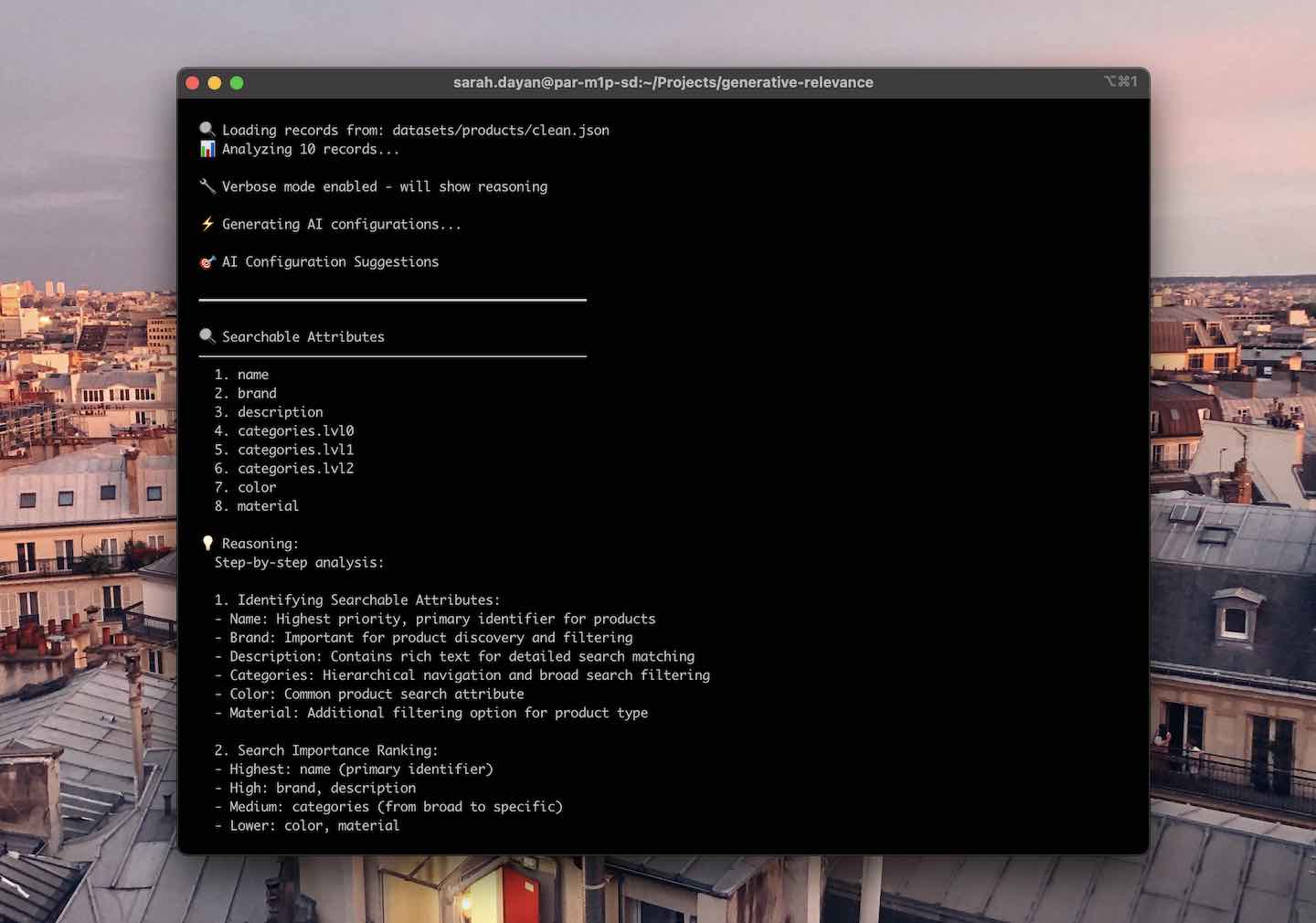
Here are the recommendations we got when analyzing a standard e-commerce dataset, using Anthropic’s Claude Haiku 3.5 model:
Searchable Attributes
name
brand
description
categories.lvl0
categories.lvl1
categories.lvl2
color
material
The agent's reasoning was spot-on. It identified the right attributes that a user would search for (with name as the highest priority given it is the primary identifier for products, brand as highly important for product discovery, etc.)
It also explicitly excluded numeric attributes like price, rating, inventory, technical attributes like objectID, product_url, image_url, or boolean attributes like in_stock, which users don’t search for with a query.
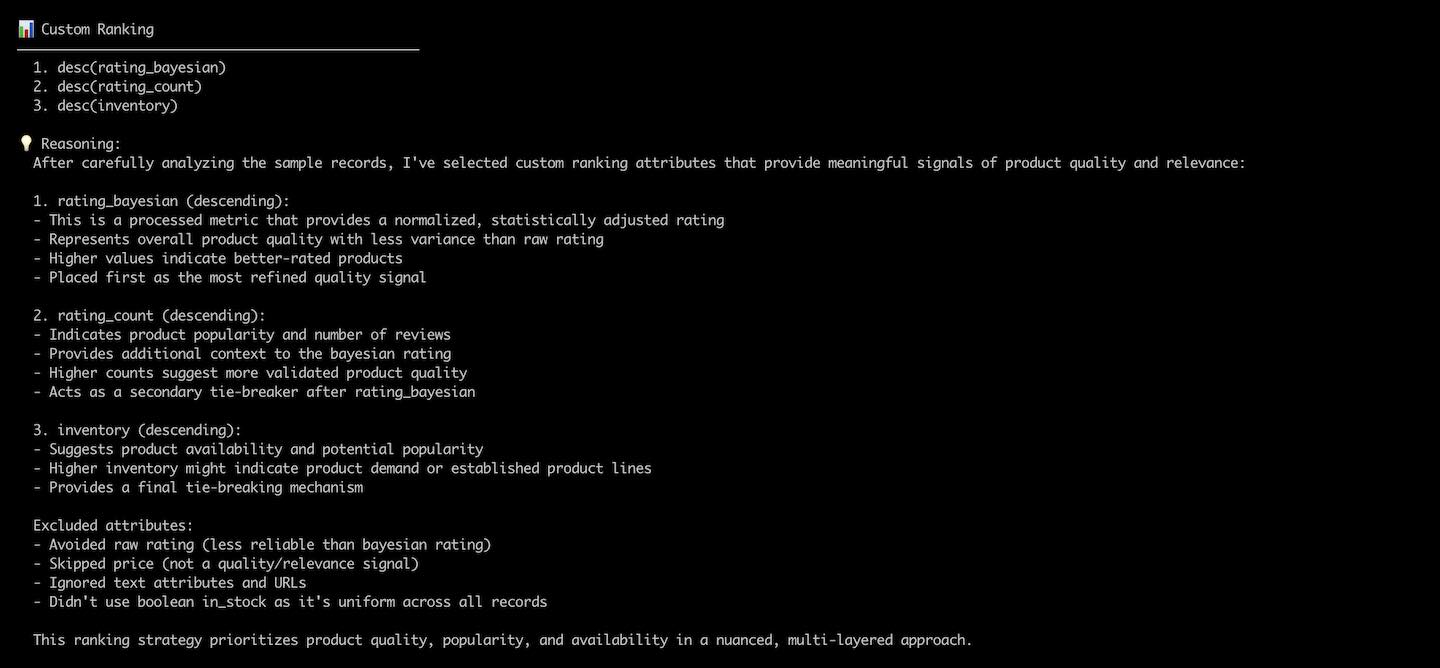
Custom Ranking
desc(rating_bayesian)
desc(rating_count)
desc(inventory)
Notice how it chose the Bayesian rating over the raw rating. The shared rationale was exactly what it was taught:
“This is a processed metric that provides a normalized, statistically adjusted rating
Represents a more sophisticated quality signal compared to raw rating
Helps surface high-quality products with more reliable scoring
Values range from 4.4 to 4.7 in the sample, indicating meaningful differentiation”
This is exactly what an expert would recommend—avoiding the common mistake of using raw ratings that can be gamed with a few 5-star reviews.
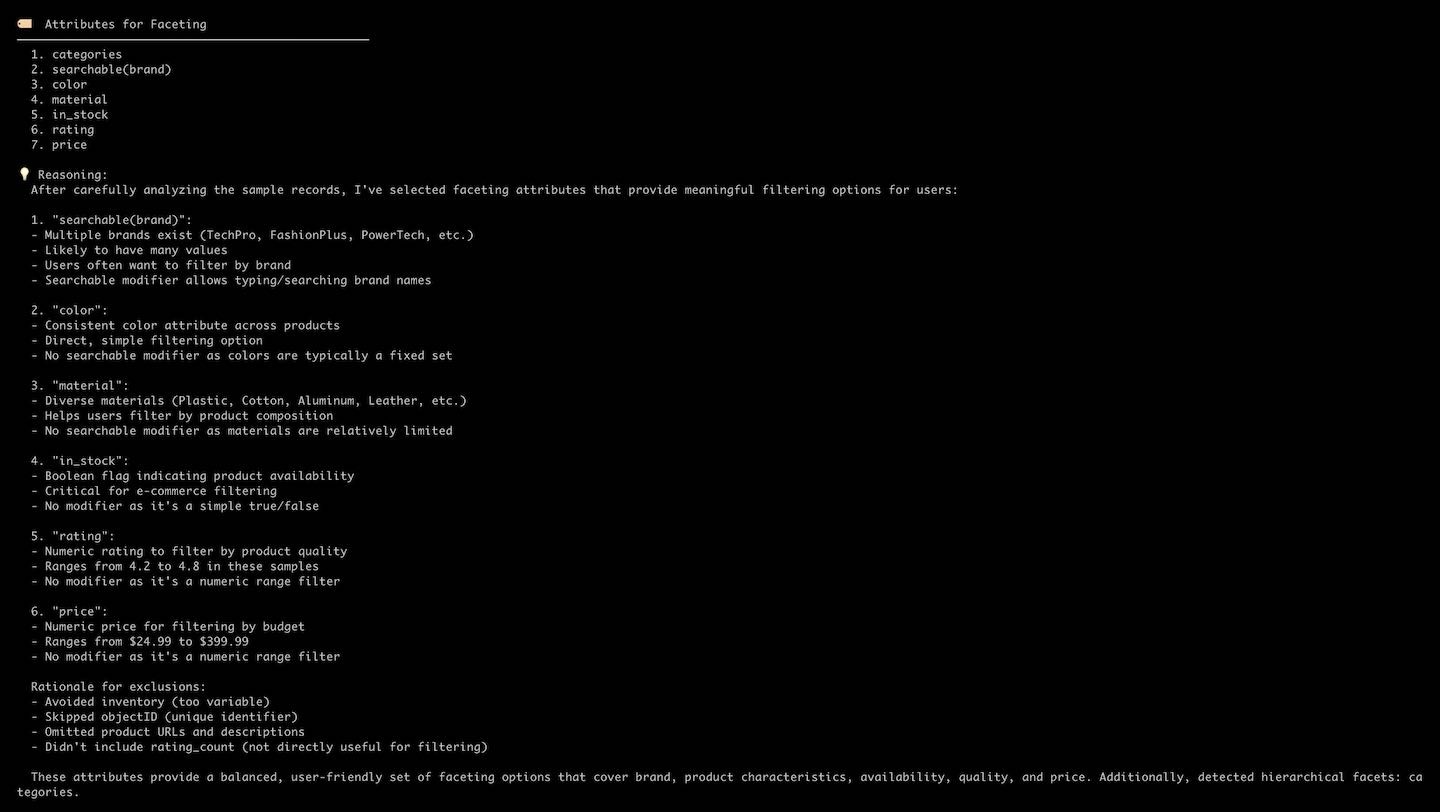
Attributes for Faceting
categories
searchable(brand)
color
material
in_stock
rating
price
Facets can be made searchable when they have many different possible values, which can’t all be displayed at once in the UI. The agent correctly identified that brand should be searchable (high cardinality), while color and material don't need to be.
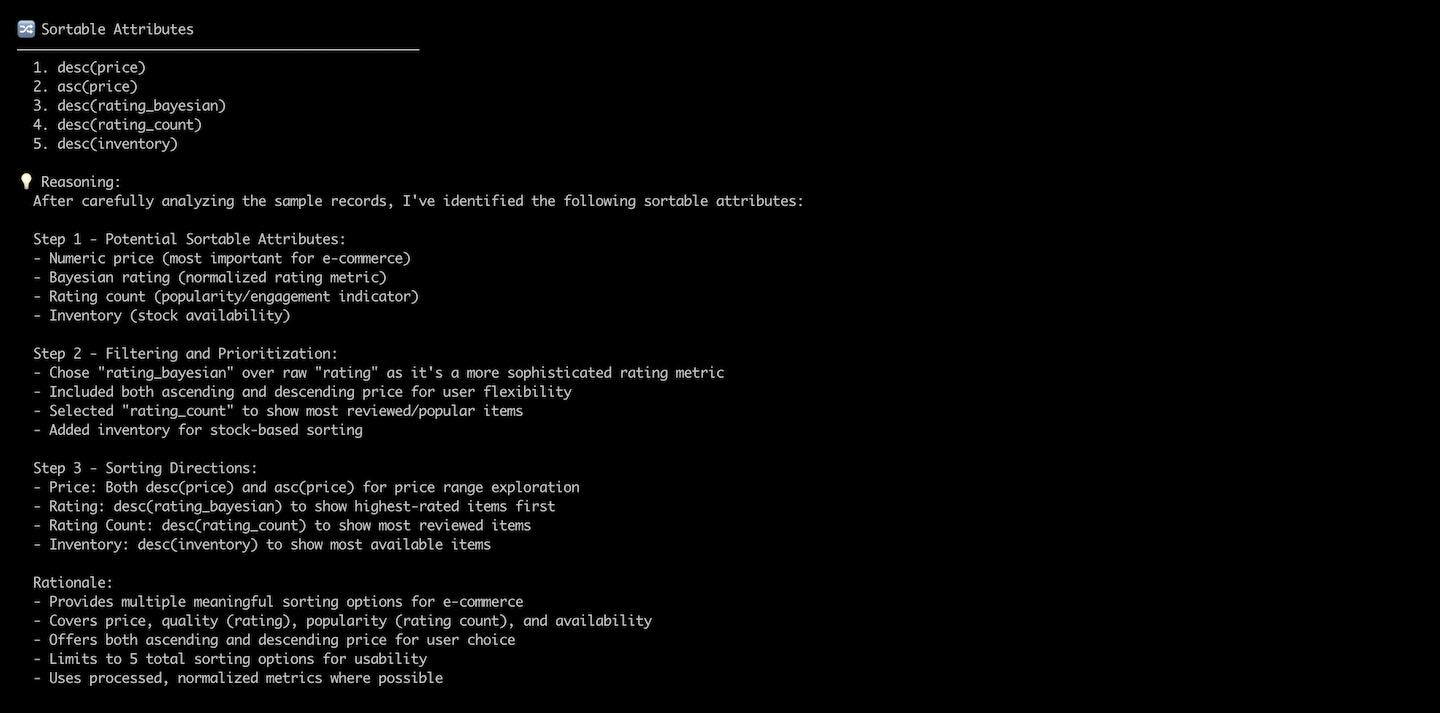
Sorting Options
desc(price)
asc(price)
desc(rating_bayesian)
desc(rating_count)
desc(inventory)
Another example of nuanced reasoning, the agent decided to provide two options for price (High to Low and Low to High, which are common sorting options in e-commerce search) but only descending options for rating_bayesian (it’s useful to see most popular products first, but not the other way around), rating_count (indicating user engagement) and inventory (useful for checking product abundance).
Technical deep dive
The prompting strategy
Getting good results required careful prompt engineering. Let’s take a look at our searchable attributes prompt:
const prompt = `
  Analyze these sample records and determine which attributes should be searchable in an Algolia search index.

  Sample records:
  ${JSON.stringify(sampleRecords, null, 2)}

  Step 1: Identify potential searchable attributes from the sample records
  Step 2: Order attributes by search importance and user intent
  Step 3: Determine modifier configuration (ordered vs unordered)
  Step 4: Format final result with appropriate modifiers

  CRITICAL RULES:
  - Only suggest attributes that actually exist in the provided sample records, don't invent ones
  - Only suggest attributes truly suitable for search. If no attributes are clearly searchable, return an empty array.

  Rules for selecting searchable attributes:

  INCLUDE text attributes that users search for:
  - Names, titles, descriptions, summaries
  - Brands, manufacturers, creators, authors
  - Categories, types, genres
  - Features, ingredients, cast, tags
  - Locations, addresses
  - Any text users might query

  EXCLUDE attributes that are:
  - URLs, IDs, dates, timestamps, booleans
  - Numeric values for ranking/sorting
  - Display-only or internal metadata

  Rules for ordering attributes by search importance:
  Order matters - first attributes have higher search relevance.
  1. Primary identifiers (name, title) rank highest
  2. Secondary identifiers (brand, creator) come next
  3. Content attributes (description, features) follow
  4. Consider user search patterns for this data type

  Rules for equal ranking attributes:
  To make matches in multiple attributes rank equally, combine them in comma-separated strings:
  - "title,alternate_title" - treats both title fields equally
  - "name,display_name" - treats both name fields equally
  - "brand,manufacturer" - treats both brand fields equally

  Rules for modifier configuration:
  - Use "unordered(attribute)" for most cases (position doesn't matter)
  - Use "ordered(attribute)" only when early words are more important
  - For array attributes: ordered may make sense when early entries are more important (cast of actors) but not for equal importance (tags)
  - Default to unordered unless position specifically matters
  - Note: ordered modifier cannot be used with comma-separated attributes

  Explain your answer step-by-step.
`;
Some key insights from crafting and refining this prompt:
Be explicit: You should be precise when telling the agent what to include and exclude. Giving examples goes a long way, but you have to make sure to extract the principles to keep your directives generic and avoid overfitting to the specific dataset you’re analyzing.
Request reasoning: Step-by-step explanations improve output quality. In their documentation, Anthropic explains that “Giving Claude space to think can dramatically improve its performance. This technique, known as chain of thought (CoT) prompting, encourages Claude to break down problems step-by-step, leading to more accurate and nuanced outputs.”. Note that CoT isn’t specific to Claude, but your mileage may vary depending on each LLM.
Even with careful prompting, LLMs sometimes suggest non-existent attributes.
We add a validation phase to strip out any attribute that isn’t present in the dataset.
const { object, usage } = await generateObject({
  model,
  maxTokens: 1000,
  temperature: 0.1,
  schema,
  prompt,
});

// Validate that all suggested attributes actually exist in the records
const searchableAttributes = validateAttributes(
  object.searchableAttributes,
  sampleRecords,
);
The CLI will still tell you what attributes have been filtered out, which is useful to recognize patterns in hallucinations: poor quality datasets, scarce number of attributes, or insufficient model power.
Context window management
The context window of an LLM is the amount of content (translated in tokens) that a given model can consider at once. The longer the prompt, the closer you get to the limit.
In the experiment, we always pass full records, not just attribute names. This matters because attribute names alone don't always provide enough context. But this creates challenges with prompt size:
Number of records
Processing time
Status
10
~10 seconds
✅ Optimal
100
~15 seconds
✅ Works well
500
~45 seconds
⚠️ Slower
1000
-
❌ Context window exceeded
While this could be handled in batches, the insight here is that you actually don't need all records, just a representative sample. Even 10 records consistently produced quality suggestions, while controlling token consumption.
Model comparison
Although we initially built the CLI with Claude 3.5 Haiku as the default model, it was essential to compare how different models perform when given the same task.
I tried:
Claude Haiku, Anthropic’s fastest model to this day
Claude Sonnet, Anthropic’s high performance yet affordable model
GPT-4.1 nano, OpenAI’s fastest, most cost effective GPT-4.1 model
Model
Cost
Quality
Notes
Claude 3.5 Haiku
10 records: $0.0174
Excellent
Best value, handles nuance well
100 records: $0.0863
Excellent
Claude 3.5 Sonnet
10 records: $0.0636
Excellent+
Slightly better on attribute ordering
100 records: $0.2390
Excellent+
GPT-4.1 nano
10 records: $0.0012
Good
Very cheap, misses nuances, more hallucinations
100 records: $0.0082
Good
Claude Haiku emerged as the sweet spot—nearly as good as Sonnet, at 27% of the cost.
There were no noticeable quality differences between 10 and 100 records.
When AI struggles: lessons from failures
The hallucination problem
AI loves to be helpful, but this sometimes comes in the way of accuracy. For example, in one test, GPT-4.1 nano suggested faceting on category when the dataset didn’t contain such attribute.
I noticed that such hallucinations happened more frequently with speed-optimized models, and worsened with poor quality data.
The validation step is here to catch such mistakes, but it shows that AI can’t be blindly trusted: it needs edge case handling and refinement over time.
Data quality matters
Inconsistent schemas and ambiguity can lead to weird suggestions:
Records with different attributes confuse the agent, especially since it only gets a subset of the dataset
Duplicate attributes (e.g., rating and rating_normalized) require explicit prompting so that only one gets picked up
When we tested with datasets having inconsistent schemas, hallucinations increased dramatically. This proves the need for health checks before analysis—AI can't fix fundamental data issues.
The nuance challenge
Some patterns are better handled with code or human intervention:
Hierarchical facets: Pattern matching beats explaining categories.lvl0, categories.lvl1 to an agent
Complex business rules: Sometimes, no obvious patterns emerge as universally correct for custom ranking
Edge cases: Boolean facets are good candidates to be marked as filterOnly, but this works poorly if intended to be used with toggle widgets
Another interesting use case was when the agent had to deal with multiple, similar attributes for custom ranking. In the products dataset, we added a rating_bayesian attribute to nuance the rating attribute, which was an average of all ratings, using the rating_count. This is what we recommend in the Algolia documentation, because the ranking algorithm uses tie-breaking: it compares records on each criterion, in their specified order, but only moves on to the next if it can’t break the tie.
But the catch is, we left rating and rating_count in the records to stick to what we usually see in customer datasets—it’s not uncommon to leave more data than you need. And depending on the model and the precision of the prompt, this is where suggestions quality would drastically differ.
When you have repetitive data, you must be extremely explicit in prompting to avoid the agent including both—and even then, it’s tough to guarantee it will comply. This further indicates that keeping only search-relevant data in your records becomes critical when processing them with a systematic tool like an AI assistant.
Comparing AI to human configuration
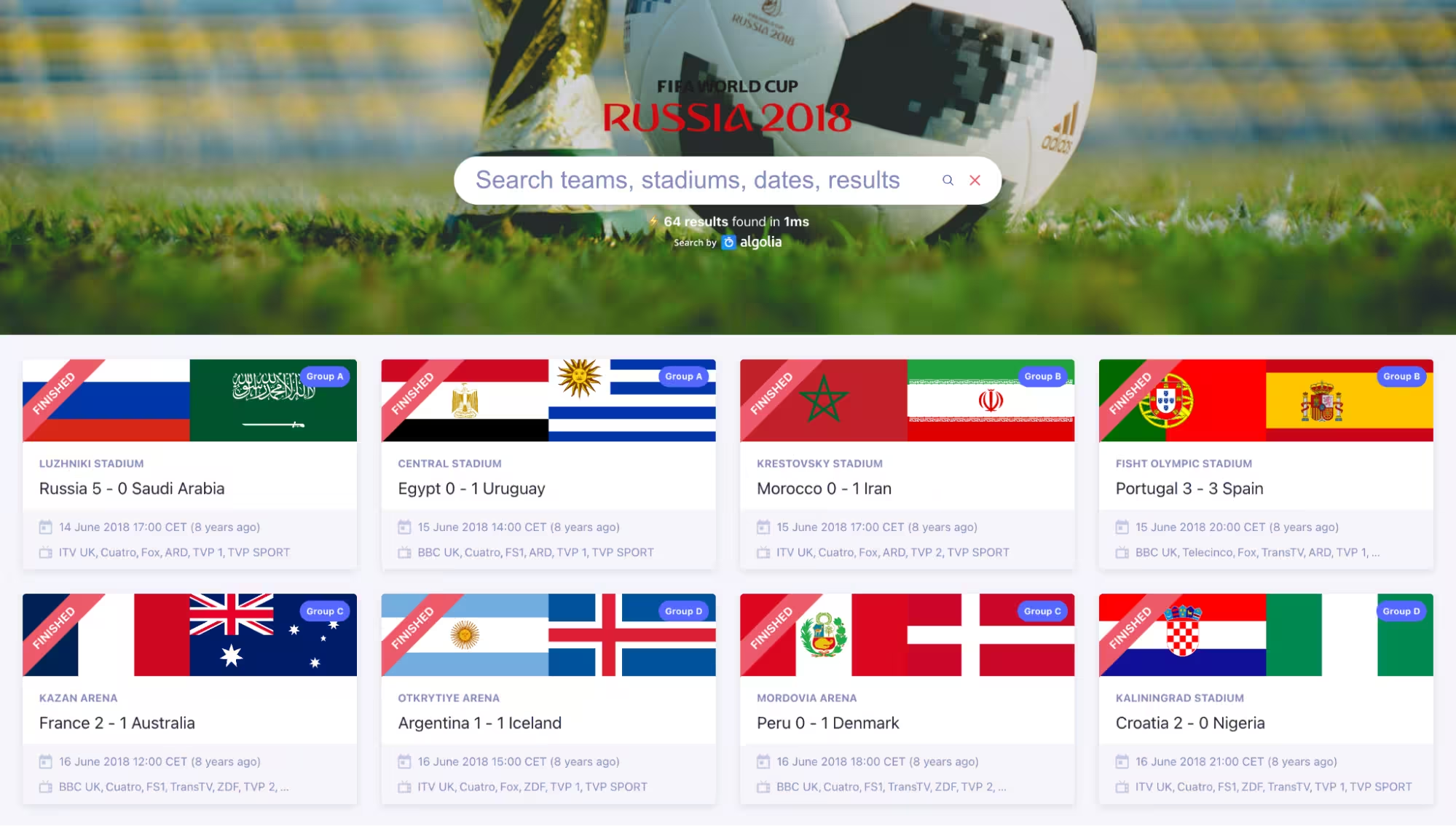
To test effectiveness, I decided to run the tool—this time using Claude Sonnet for optimal accuracy—on an index I created when I was a new hire at Algolia. This was 2018, and as the FIFA World Cup was about to start, I indexed every game with information on what teams were playing, on what day, in what stadium, what TV channels were broadcasting it, what phase of the tournament it was, and I updated scores live as the games would end.
This was my first “real” production Algolia implementation, and I configured it like I expect any customer would: following the documentation, testing settings out, until things “looked good”.
The AI actually did better than me.
Searchable attributes
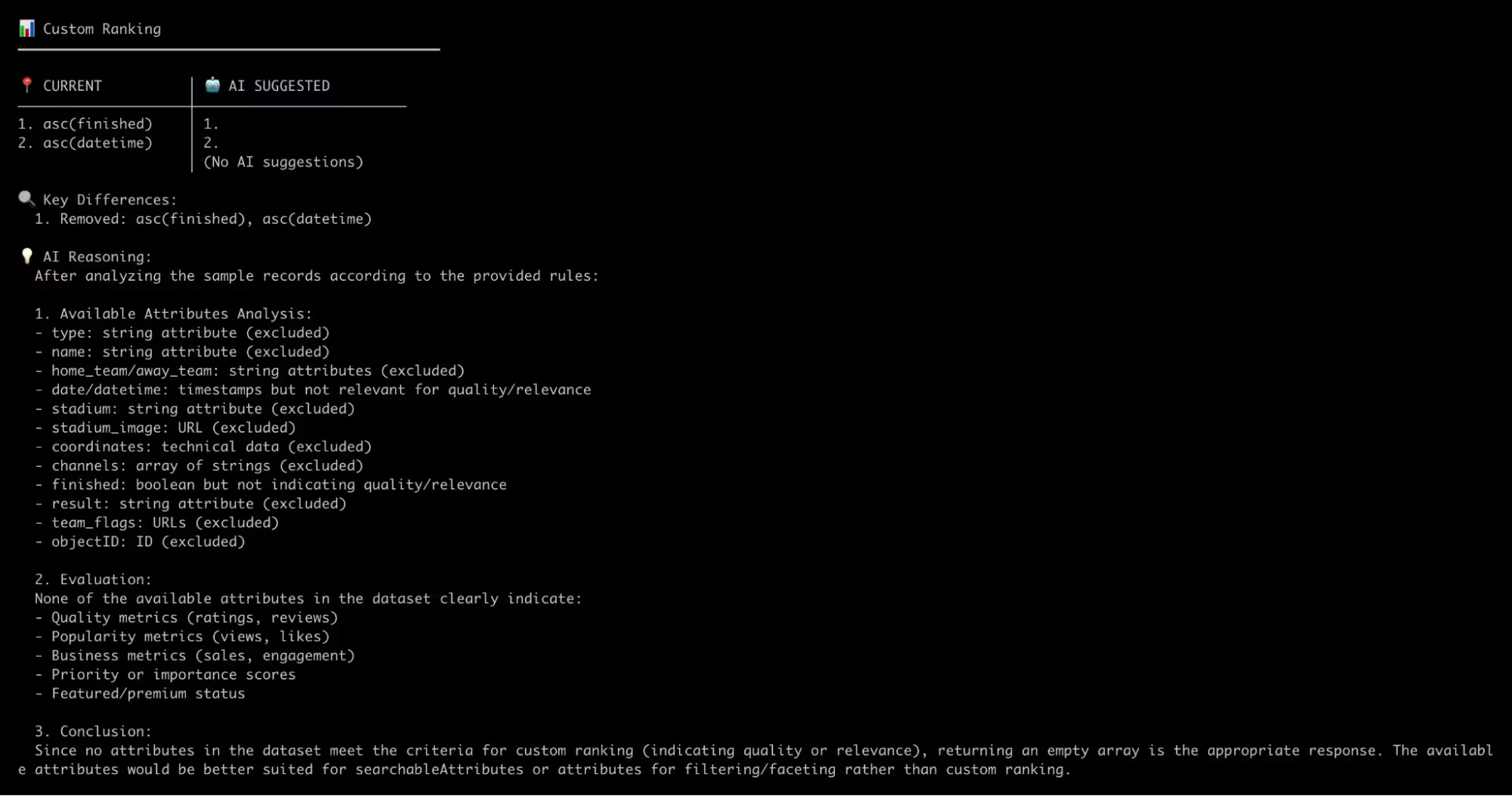
Custom ranking
Attributes for faceting
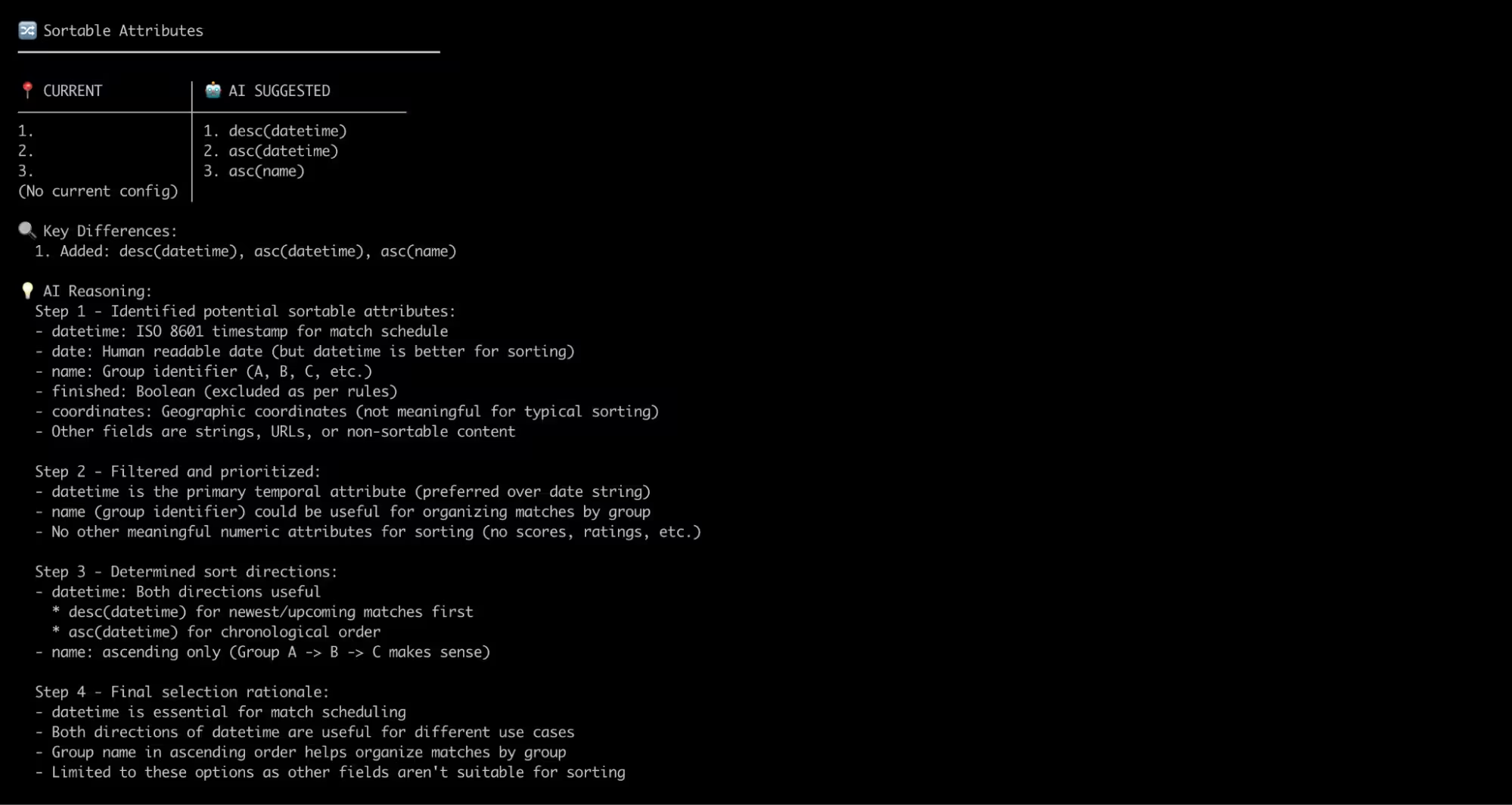
Sorting options
My configuration was riddled with rookie mistakes:
I made the result attribute (the final score) searchable—but who searches for "5-0"?
I had a strange custom ranking setting on finished (boolean, indicating the game was over) and datetime (string, which is incorrect for custom ranking) which is a rationale I can’t even explain today
I had no facet modifiers, so none of my facets were searchable, while there were 32 national teams playing, 15 TV broadcasters, and 12 stadiums—a lot to fit in a mobile screen!
I completely forgot to add sorting options
Here’s how AI improved it:
It correctly excluded result from searchable attributes
It wisely avoided custom ranking due to the absence of any viable attribute in the dataset, reckoning that they would be more appropriate for searching or filtering/faceting.
It added proper facet modifiers (searchable for home_team, away_team, channels and stadiums)
It suggested datetime sorting for "Upcoming games" and "Chronological order", and name for organizing games by group (which it inferred based on the attribute values)
Everything that was right about my manual configuration was also picked up by the agent, only better, by fixing my beginner mistakes.
Note that many improvements could be further made at the dataset level (e.g., providing a list of all teams instead of home_team and away_team for better faceting, storing scores as numbers, etc.), which would result in even better relevance settings. Here again, AI is doing its best with the data it has.
# Install and setup
npm install
echo "ANTHROPIC_API_KEY=your_key" > .env

# Analyze your data
npm start -- analyze your-data.json --verbose

# Compare with existing index
npm start -- compare YOUR_APP_ID YOUR_API_KEY your_index --verbose

# Try different models
npm start -- analyze data.json --compare-models claude-3-5-haiku-latest,gpt-4.1-nano
Try multiple datasets - See how AI handles different data structures
Compare with your existing indices - Does AI suggest relevant improvements?
Test more models - PRs welcome to add more OpenAI models, Mistral, Gemini, etc.
More importantly, we want your feedback! We're especially interested in:
Quality of suggestions on your real data
Edge cases where AI struggles
Ideas for improvement
See anything we could improve? Open an issue and let us know.
On human expertise
While AI handles systematic patterns well, human judgment is still crucial for:
Business-specific rules: There are signals only you understand in your business strategy
Industry regulations: Compliance requirements that aren't obvious from data
Cultural considerations: Search behavior may vary depending on the market
Strategic decisions: Should you optimize for conversion or discovery?
AI is not magic—it does what you ask. Use this as a foundation that takes you close to the finish line, so you can focus your efforts on what only you can do.
The bigger picture
This experiment taught me that AI excels at systematic knowledge. When best practices are consistent and well-documented, AI can apply them effectively. It won't capture every nuance of your specific use case, but it provides a solid foundation to refine rather than starting from scratch.
The future isn't AI replacing search experts, but helping every Algolia user configure search like an expert. By commodifying the routine parts of configuration, we can free up developer time to focus on what makes their search unique: understanding their users and crafting exceptional experiences.
I presented on this topic at Algolia DevBit 2025, which you can watch below.



.webp)















%20(2).svg)
