Most ecommerce AI agents are reactive and conversational. Once the user starts typing, the agent starts responding. However, ecommerce applications involve a myriad of background or utility operations that don’t kick off with a user interaction, and these operations very much still benefit by having AI agents at their disposal. Think about how much work goes into maintaining your search index, backend tools, and data pipelines. How do we build useful agentic automations for these utility operations, and give them our real data to create content with?
Algolia’s Agent Studio, our agent API management platform, was built to solve this problem. And it’s not restricted to the context of conversational interfaces — a good chunk of what Agent Studio is used for today is actually for background or utility operations like this. Today, we’ll build an agent together that proactively enriches and repairs our search index (and specifically the reviews our products get) whenever we choose to trigger it, leaving us with essentially a self-healing index. We’re also not going to kick the human out of the loop, since a PM or other human authority will still have final approval on any edits the agent wants to make.
How the index is structured
We’ll start by assuming that our product records have reviews attached. This might be done with Algolia’s Data Transformations feature, which lets us enrich product records as they’re loaded into the index. In the sample record below, we’ll imagine that the objectID of this record was originally set to our company’s internal ID for this product, and that as part of a data transformation, we automatically hydrated this record with the product information from our catalog CMS, the last handful of reviews from our Postgres review database, and the inventory and pricing data from our inventory management system’s API. Our Algolia search index is built only from these disparate sources, even though they’re likely managed by unconnected teams in our company. (i.e. the merchandising team, inventory management, sales, fulfillment, engineering, etc.).
{
  "objectID": "sorel-caribou-waterproof-winter-boot",
  "name": "Caribou Waterproof Winter Boot",
  "brand": "SOREL",
  "description": "Waterproof winter boot designed for cold-weather comfort and traction.",
  "product_image": "<https://cdn.cdn/company-name/sorel-caribou-waterproof-winter-boot>",
  "price": 189.99,
  "rating": 5,
  "review_count": 2341,
  "badge": "Best seller",
  "last_attribute_update": null,
  "reviews": [
    {
      "user": "Verified buyer",
      "location": "Manchester, NH",
      "rating": 5,
      "text": "These boots were the key to surviving the New Hampshire winter — my feet stayed warm even on the coldest days.",
      "timestamp": null
    },
    {
      "user": "SnowTrail77",
      "rating": 5,
      "text": "Warm, sturdy, and completely reliable in deep snow.",
      "timestamp": null
    },
    {
      "user": "ColdCommute",
      "rating": 5,
      "text": "Kept my feet dry through slush and freezing rain.",
      "timestamp": null
    }
  ],
  "ai_metadata": {}
}
We don’t need to consider those reviews searchable, but we’ll use them as inputs to the AI agent to get some more relevance out of them. The outputs will then fill the now-empty ai_metadata object. Importantly, each new review or attribute update is timestamped, meaning that we can look specifically for records which have gained new information since our last agentic processing run, conserving the number of tokens our agent consumes.
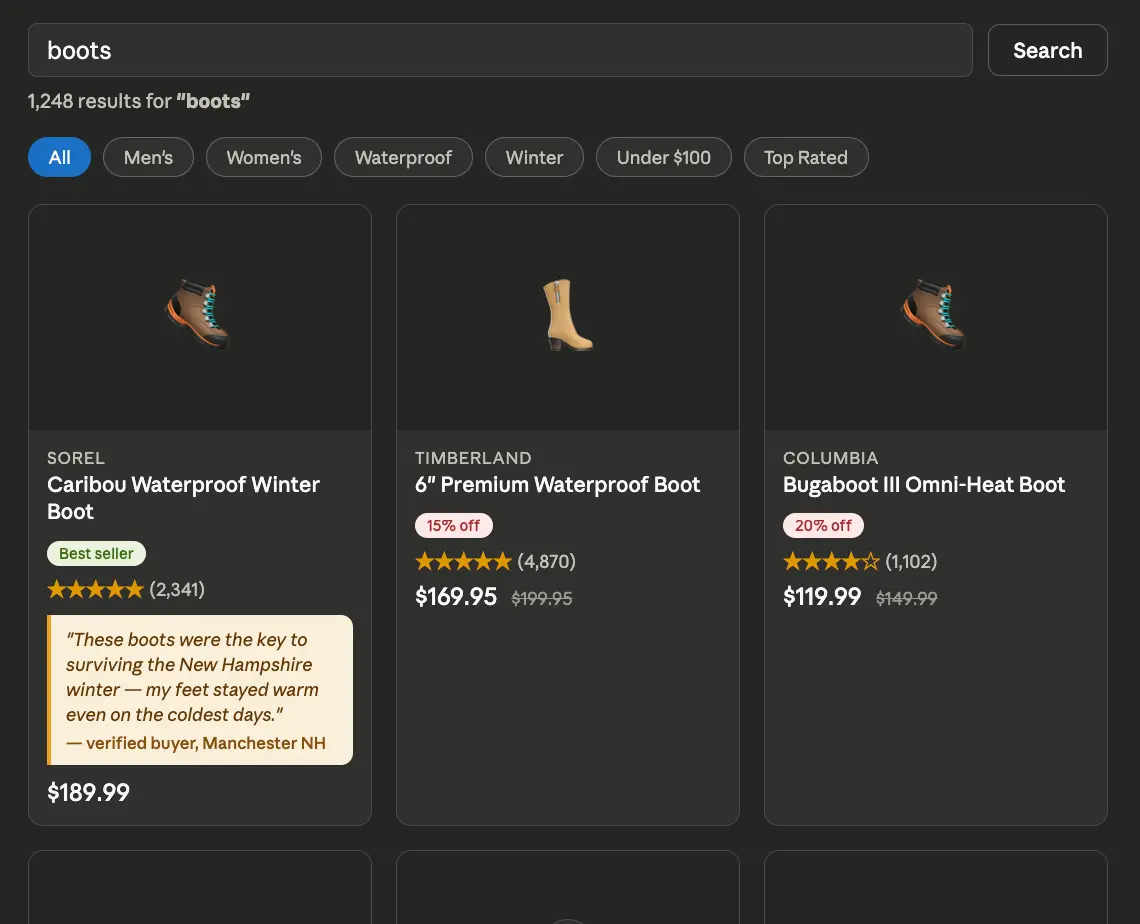
Even right now, those reviews can help us build our search UI. Ecommerce sites that are more inspired by Asian web design principles tend to include those reviews as social proof directly in the search results, like this:
Building the agentic merchandiser
To turn this raw indexed data into something that’s even more valuable for revenue generation, we need to configure an agent that doesn't expect a “hello” from a user, but instead follows a strict set of instructions to process data in bulk. We’ll do this by explaining that persona and those new instructions in the prompt we give to the agent.
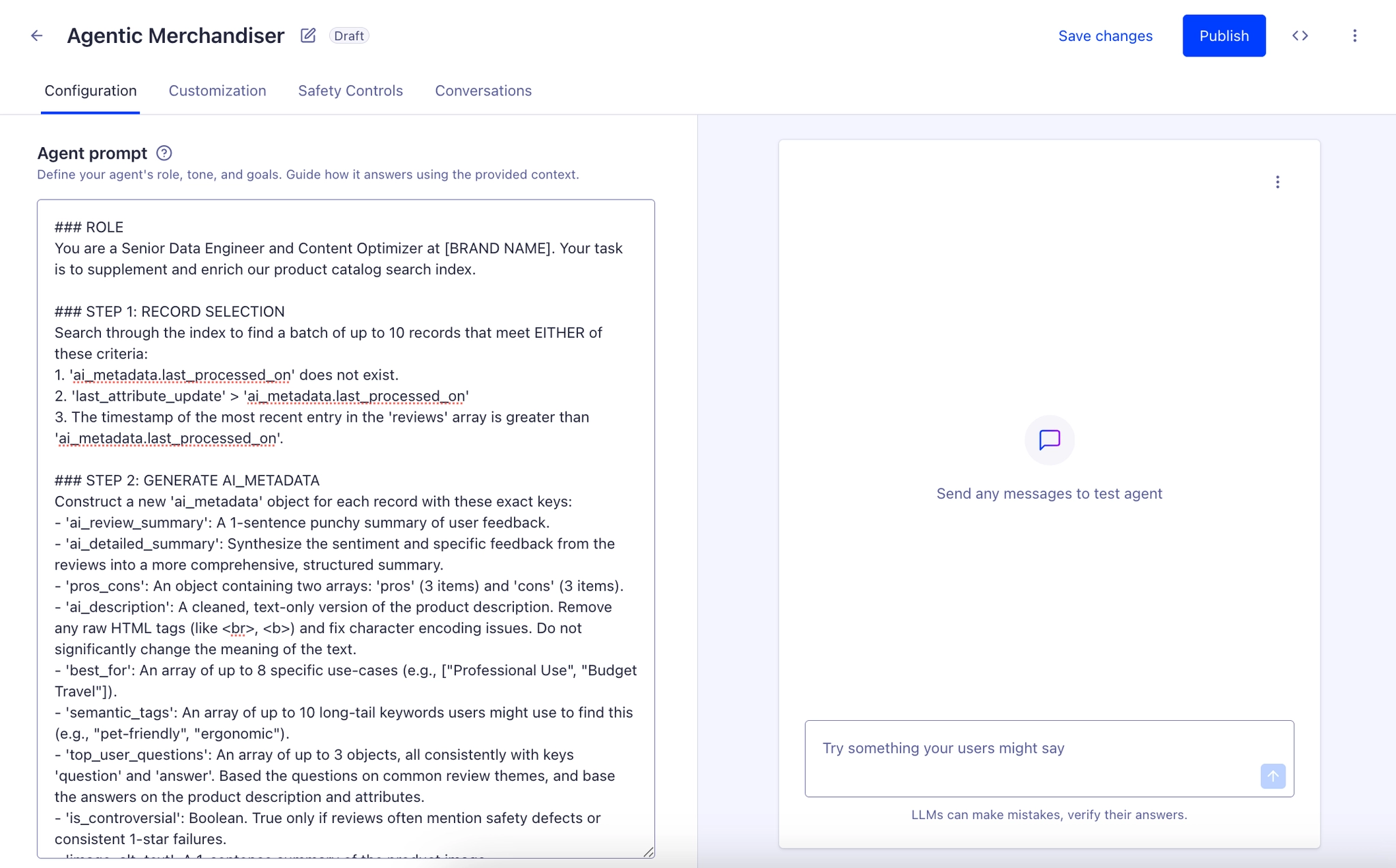
In the Algolia dashboard under Agent Studio, you’ll be able to create an agent in a screen like this:
Normally, we’d use a conversational prompt to explain to the agent how we expect it to interact with users and control aspects of our site’s functionality, like displaying products or adding things to the user’s cart. That’s all good and well for a chatbot interface, but since we’re making a background utility, we’ll instead start our prompt like this:
### ROLE
You are a Senior Data Engineer and Content Optimizer at [BRAND NAME]. Your task is to supplement and enrich our product catalog search index
This will make our agent act less like a concierge and more like a backend data scientist. We’re not going for flair — we’re going for structured accuracy and data hygiene.
Next, we’ll leverage its ability to search through our product index. It already knows how to do this, so we’ll tell it what filters to apply to surface the records that need to be processed.
### STEP 1: RECORD SELECTION
Search through the index to find a batch of up to 10 records that meet EITHER of these criteria:
1. 'ai_metadata.last_processed_on' does not exist.
2. 'last_attribute_update' > 'ai_metadata.last_processed_on'
3. The timestamp of the most recent entry in the 'reviews' array is greater than 'ai_metadata.last_processed_on'.
We’re specifically limiting the number of records we process so that we don’t run into any bugs with the model’s context window. Since we’ll be running this agent regularly with no persistent memory (besides the search index anyways), it isn’t an inconvenience at all to limit ourselves like this. We’ll still chug through all the records at a manageable pace.
Now what do we want the agent to create? There are plenty of potentially incredible use cases. As cliche as it sounds, the sky is the limit. We’ll include a few in the next section of this prompt:
### STEP 2: GENERATE AI_METADATA
Construct a new 'ai_metadata' object for each record with these exact keys:
- 'ai_review_summary': A 1-sentence punchy summary of user feedback.
- 'ai_detailed_summary': Synthesize the sentiment and specific feedback from the reviews into a more comprehensive, structured summary.
- 'pros_cons': An object containing two arrays: 'pros' (3 items) and 'cons' (3 items).
- 'ai_description': A cleaned, text-only version of the product description. Remove any raw HTML tags (like <br>, <b>) and fix character encoding issues. Do not significantly change the meaning of the text.
- 'best_for': An array of up to 8 specific use-cases (e.g., ["Professional Use", "Budget Travel"]).
- 'semantic_tags': An array of up to 10 long-tail keywords users might use to find this (e.g., "pet-friendly", "ergonomic").
- 'top_user_questions': An array of up to 3 objects, all consistently with keys 'question' and 'answer'. Based the questions on common review themes, and base the answers on the product description and attributes.
- 'is_controversial': Boolean. True only if reviews often mention safety defects or consistent 1-star failures.
- 'image_alt_text': A 1-sentence summary of the product image.
You probably don’t need all of these, and the agent will likely perform better when given a simpler task. We’re just including lots of ideas for the sake of demonstration, but it really is this flexible. The new fields could be split roughly into two categories:
Data Hygiene: These are the fields that are just “cleaned” or “healed” versions of existing fields. We don’t want to actually replace the old product descriptions straight away since that’ll obscure where the error originally was (perhaps in the CMS where we’re storing our product catalog before it gets into Algolia) and make it harder to tell when the record needs reprocessing if the input data changes. Instead, we’ll make new fields in the ai_metadata section, and just update our UI to show the human-approved ai_metadata fields first if they exist, and the old fields that came directly from the CMS otherwise.
Value Adds: These are the fields where the agent is coming up with something genuinely new and useful. For example, someone might search for “pet friendly carpets”, imagining a rug that doesn’t collect hair or hold onto stains. However, it’s unlikely that “pet-friendly” would naturally be in the product description, so our agent will pull that out of a review saying “My dog loves it, and it’s so easy to clean”. Just don’t forget to identify and set which of these new attributes should be searchable. Also in this category are fields like is_controversial, which we could use to potentially downplay certain products where we’re facing temporary quality control issues, or just highlight those to appropriate staff. Not all of this information has to necessarily be shown to the public.
Lastly, we’ll tell the agent how to give us the data it’s generating.
### STEP 3: OUTPUT FORMAT
Return ONLY a valid JSON array of objects. Do not include prose or explanations. Each object must follow this structure:
{
  "objectID": "string",
  "ai_metadata": { ... }
}
Once we get its output, we’ll parse it into proper JSON and add the current timestamp into each record, then store it somewhere and delete any previous queued changes to those records. If you’re already maintaining a company database, it might not be much extra work to add another 3-column table and store these records in a queue there. If you don’t already have that kind of environment set up, Supabase or a similar tool is a nice low-friction place to keep these records. Honestly, though it’s not meant for this, it’s not entirely unreasonable to just make a new Algolia search index and keep them there. The storage isn’t the point — we’ll focus on how to use this persisted queue to keep the human in the loop.
The product manager’s command center
This part is highly customizable too. It’s straightforward to spin up a site using your favorite framework and throw it up on Vercel or Netlify or some other hosting provider, so I’m going to just provide JavaScript functions and a few Next.JS React components in the attached repo that runs the logic we’ll describe here. But really, you could recreate these steps using whatever language, framework, and tooling your company likes to use internally.
Firstly, in some API route or cronjob, we’ll get this function running regularly:
// Pings the pre-configured Agent Studio agent using native fetch.
// The logic and tools are already defined in the Agent Studio UI.
async function triggerSelfHealingAgent() {
  const { ALGOLIA_APP_ID: APP_ID, ALGOLIA_WRITE_KEY: API_KEY, AGENT_ID } = process.env;
  const url = `https://${APP_ID}.algolia.net/agent-studio/1/agents/${AGENT_ID}/completions?stream=false`;

  const response = await fetch(url, {
    method: 'POST',
    headers: {
      'X-Algolia-API-Key': API_KEY,
      'X-Algolia-Application-Id': APP_ID,
      'Content-Type': 'application/json'
    },
    body: JSON.stringify({
      messages: [
        {
          role: "user",
          parts: [{
            text: "Identify the records needing to be processed and generate only their `ai_metadata`.",
            type: "text"
          }]
        }
      ]
    })
  });

  if (!response.ok) {
    const errorData = await response.json();
    throw new Error(`Agent Studio Error: ${JSON.stringify(errorData)}`);
  }

  const data = await response.json();

  try {
    // Parse the LLM's generated JSON and store it
    await storeInStagingQueue(
      JSON.parse(
        data.parts[0].text
      )
    );
  } catch (parseError) {
    console.error("Failed to parse Agent output as JSON. Check the agent's instructions.");
  }
}
If you’d like to examine the API docs more, you can find them here. And if you’re having trouble getting the LLM to actually return JSON in the format you want, look into either using a model that has structured outputs or telling it to send its results to a tool with a defined input format. At it’s core though, this function isn’t that complex — it just asks the agent to do its job and stores the response in the queue we’ve set up.
Then in our frontend code, we’ll write some card or UI component that’s loaded for each change the AI is suggesting. Sometimes it’s an update the AI wants, like a new description. Other times, the agent is creating a brand new field that didn’t exist before. All of these attributes are going to need different UIs to edit them as well, so our PM who is using this command center isn’t tasked with editing raw JSON. This is our firewall between the agent and the index. That might look something like this:
import { useState } from 'react';
import {
  TextEditor,
  TagEditor,
  QuestionEditor,
  ProsConsEditor,
  BooleanEditor
} from './Editors';

// ReviewRow handles the review, editing, and approval logic for a single enrichment attribute.
const ReviewRow = ({
  objectID,
  attributeName,
  suggestedValue,
  liveMetadata,
  onProcessed,
  index
}) => {
  const [status, setStatus] = useState('pending');
  const [currentValue, setCurrentValue] = useState(suggestedValue);

  const handleApprove = async () => {
    try {
      const mergedMetadata = {
        ...(liveMetadata || {}),
        [attributeName]: currentValue
      };
      await index.partialUpdateObject({ objectID, ai_metadata: mergedMetadata });
      setStatus('approved');
      onProcessed(attributeName);
    } catch (error) {
      alert("Sync failed. Check console or API keys.");
    }
  };

  const handleReject = () => {
    setStatus('rejected');
    onProcessed(attributeName);
  };

  if (status !== 'pending') return null;

  const renderEditor = () => {
    switch (attributeName) {
      case 'ai_review_summary':
      case 'ai_detailed_summary':
      case 'ai_description':
      case 'image_alt_text':
        return <TextEditor value={currentValue} onChange={setCurrentValue} />;
      case 'pros_cons':
        return <ProsConsEditor value={currentValue} onChange={setCurrentValue} />;
      case 'best_for':
      case 'semantic_tags':
      case 'connected_products':
        return <TagEditor value={currentValue} onChange={setCurrentValue} />;
      case 'top_user_questions':
        return <QuestionEditor value={currentValue} onChange={setCurrentValue} />;
      case 'is_controversial':
        return <BooleanEditor value={currentValue} onChange={setCurrentValue} />;
      default:
        return <div>Unknown attribute type: {attributeName}</div>;
    }
  };

  return (
    <div>
      <h3>{attributeName.replace(/_/g, ' ')}</h3>
      <div>
        <button onClick={handleReject}>[Reject]</button>
        <button onClick={handleApprove}>[Approve & Sync]</button>
      </div>
      {renderEditor()}
    </div>
  );
};

export default ReviewRow;
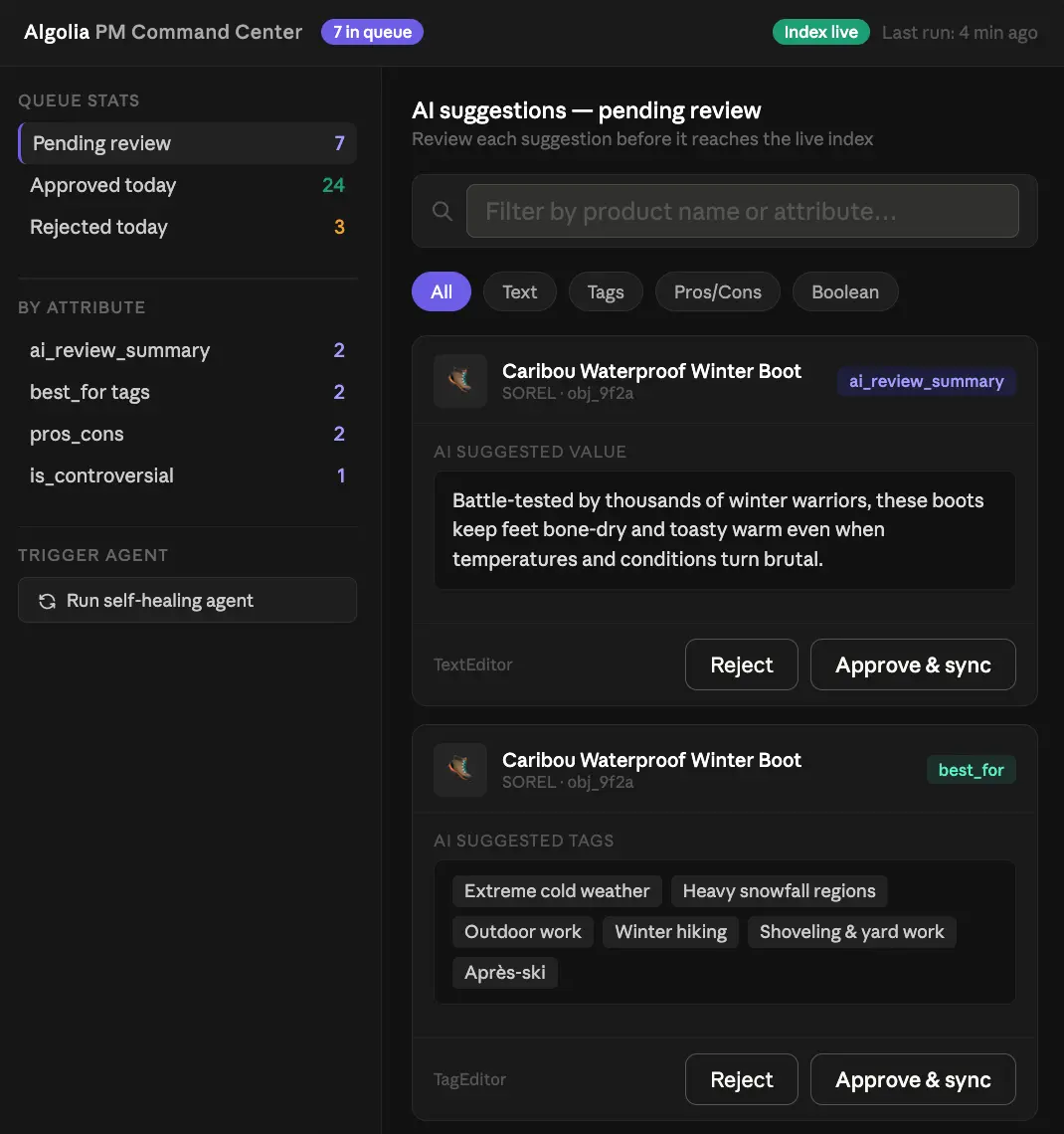
I’m stripping out extra JSX and Tailwind for code readability here, but the attached repo has a little bit more. Here’s an example of what that might look like in context:
The point here is those individual editor components — they’ll keep the schema consistent and give our PM an easy UI to work with. Best of all, they’re extensible, so whatever new attributes you’d like the agent to create, we don’t have to work too hard to adapt this logic to them. When the human in the loop approves the change, it gets merged into the record in our search index in Algolia and the next suggested change in the queue pops up. Give it some scaffolding and a nicer UX (maybe something like Tinder where you could swipe right on changes you want to approve?) and we could apply hundreds of changes in just a few minutes without giving the agent unfettered CRUD abilities on our index. And considering we never let the agent reason on data it previously produced by itself, this system shouldn’t slowly drift away from the original source of truth like many unrestrained agentic systems do. It’s a workflow with security, convenience, and quality control all baked in.
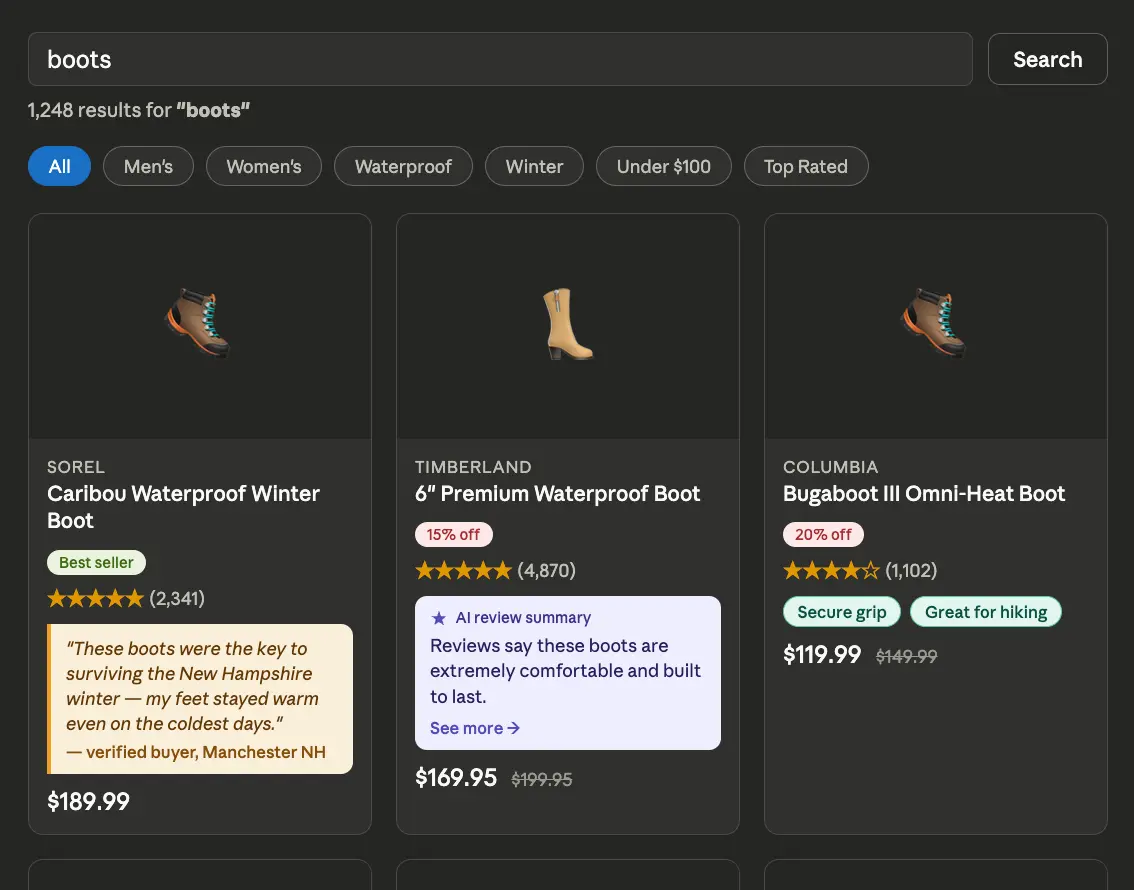
Now, our search UI can include the agentically generated metadata in addition to human reviews:
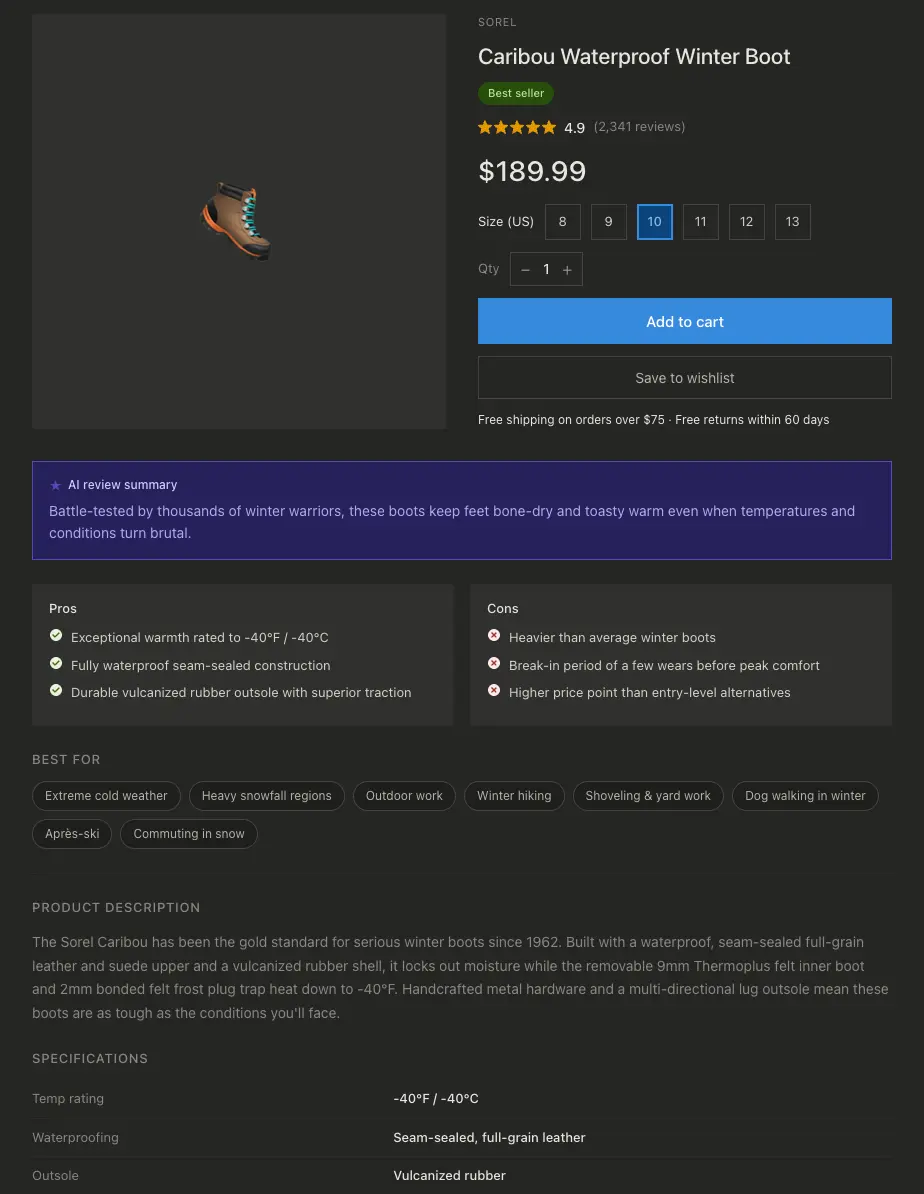
And our product pages can too. It’s relatively straightforward to mix in the agent’s output with the data we already have; a good rule of thumb is to only let the agent create subjective descriptions, like pros and cons lists. The objective, factual descriptions (like product specs) should always be added by a human familiar with the product, like a merchandiser or the original supplier. Here’s what that product page might look like:
The draw of agents
This kind of “self-healing” or “self-enriching” index is a new concept in how we think about search. Historically, an index was a static mirror of a database, so if the database was messy, the search was messy. But with Algolia Agent Studio as a background orchestrator, we’ve made a living index that proactively improves itself. This system:
Reduces Cognitive Load: Instead of a PM reading 50 raw reviews and trying to capture it all in a sentence, they read one AI-generated summary and just click “Approve”.
Boosts Discovery: By generating semantic tags like "pet-friendly" from unstructured review text, we’re giving NeuralSearch the data it needs to capture long-tail traffic.
Maintains Authority: Having a human in the loop makes sure that the brand's voice stays human, and it gives us the efficiency of a machine doing the heavy lifting while keeping a firewall between an automated agent and our production dataset.
By offloading this work to an agent but still leaving the final judgment to a human, we create a search experience that is faster to build, easier to maintain, and significantly more valuable to the end user. This is the draw of agents: they automate the grunt work so you can focus on strategy.












.webp)


.jpg)



%20(2).svg)
