Building a modern application on Vercel increasingly means choosing the services you need and letting the platform handle the integration. Import a repo, add a database from the Marketplace, and Vercel provisions it, manages billing, and injects the credentials directly into your project. What used to require manual setup and glue code is becoming part of the deployment workflow.
Search is now one of those ingredients. With the Algolia native integration, live on the Vercel Marketplace, Vercel can provision an Algolia application the same way it provisions a database. Click install, choose a plan, deploy: your application has search, with keys already in place.
"Search is essential to nearly every application, but it's rarely treated like infrastructure. With Algolia as a native integration on the Vercel Marketplace, search now sits alongside the rest of the stack: provisioned from Vercel, running in minutes."
-Hedi Zandi, Head of Vercel Marketplace
On the Growth team at Algolia, we built the integration to make that happen. Let’s see what it does and how to use it.
What "native" means on Vercel
When choosing integrations from Vercel's Marketplace you’ll find they come in two flavors: connectable-account and native. A connectable-account integration links Vercel to an account you already have somewhere else. A native integration goes one step further further and provisions and manages the resource directly from the Vercel dashboard, billed through your Vercel account.
Since Algolia is a native integration, you don’t need to sign up separately and you don't end up with a second invoice or a second set of credentials to manage.
From Vercel's point of view, an Algolia application is a resource it can create, connect to projects, and bill for, the same way it treats a database from one of its storage partners.
The installation flow
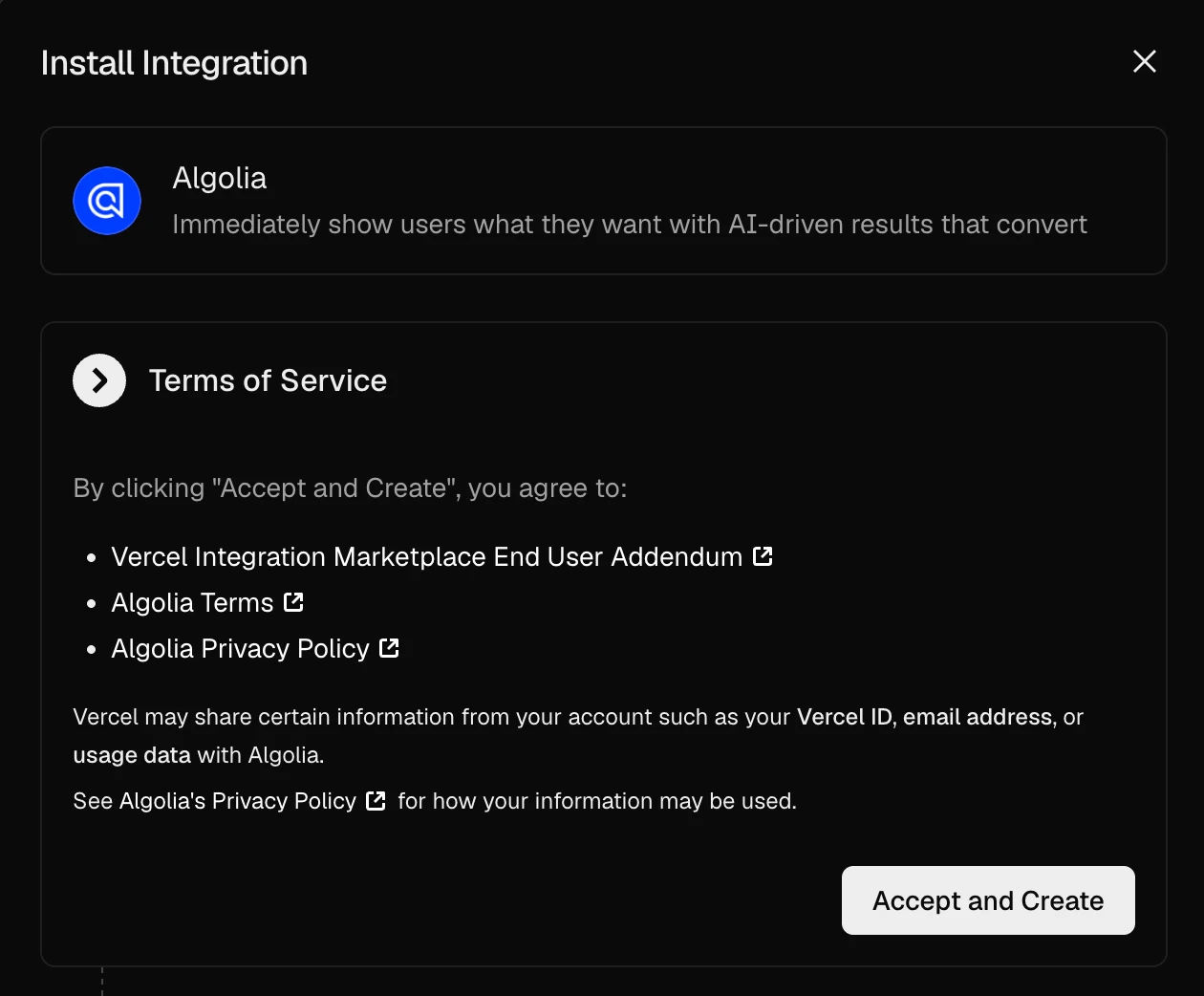
From the Algolia listing on the Vercel Marketplace, click Install. Vercel and Algolia run an OAuth handshake behind the scenes. That handshake is what replaces "go create an account": you authorize once, and the two platforms can act on your behalf from then on. No credentials to copy around.
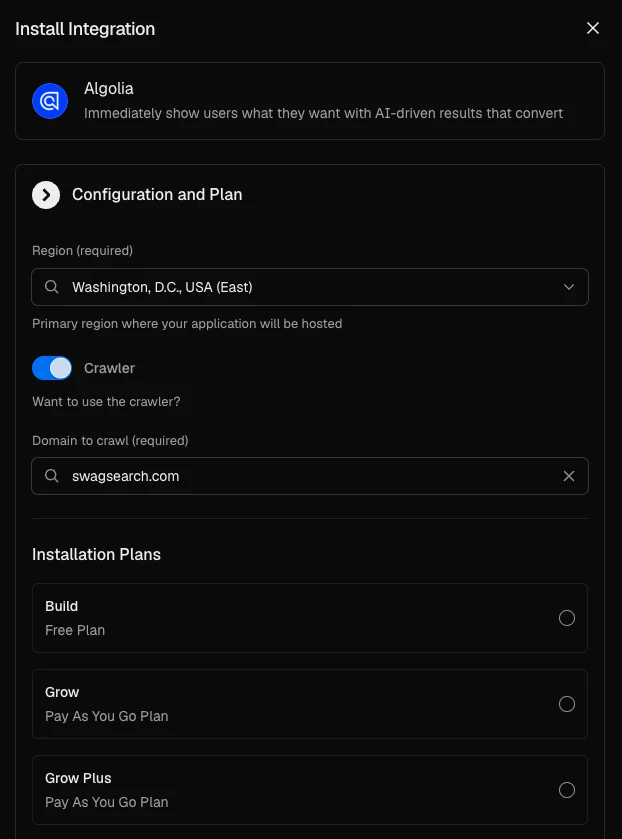
The wizard then walks you through a few choices:
Select the region where your Algolia application will be hosted.
Optionally enable the Algolia Crawler for one of your Vercel domains.
Pick a plan.
Name your application and confirm.
Activating the Crawler automatically validates your Vercel domain, so it’s ready for your first crawl as soon as you get to the Algolia Crawler dashboard and configure it. It remains the fastest way to make an existing site searchable without building an indexing pipeline.
Free - free tier with up to 10k transactions a month
Grow - pay-as-you-go keyword for >10k transactions
Grow Plus - pay-as-you-go with AI powered search, ranking, synonyms, and personalization
Whichever you pick, it shows up on your Vercel invoice, not a separate Algolia one.
When you confirm, Algolia provisions the application. There's no "now go finish setup on the Algolia dashboard" step.
When you do want the Algolia dashboard, to browse your indices, tune relevance, or configure the crawler, your new account is one click away: use the Vercel SSO button on the sign-in page, or click "Open in Algolia" on your resource page in Vercel, to get deep-linked into our dashboard.
Environment variables, synced
Once the application exists, its credentials are added to the environment variables of the Vercel projects you connected:
ALGOLIA_APP_ID, which identifies your application
ALGOLIA_SEARCH_API_KEY, a search-only key for the frontend
ALGOLIA_WRITE_API_KEY, an indexing key for your server-side code
Nothing revolutionary here. It's the same copy-paste you've done a dozen times, just done for you with no typos, and no "works locally, 401s in production" follow-up when an environment gets missed.
Keep in mind that with Algolia, there are two different keys for a reason.
The search key can only query your indices, so it's safe to ship to the browser.
The write key can create and update records, so it has to stay server-side: use it in your indexing scripts, never in a client bundle.
Always remember to re-deploy to Vercel after updating any environment variables, so the new values get injected into the running instances.
Deploy your own Algolia + Next.js app
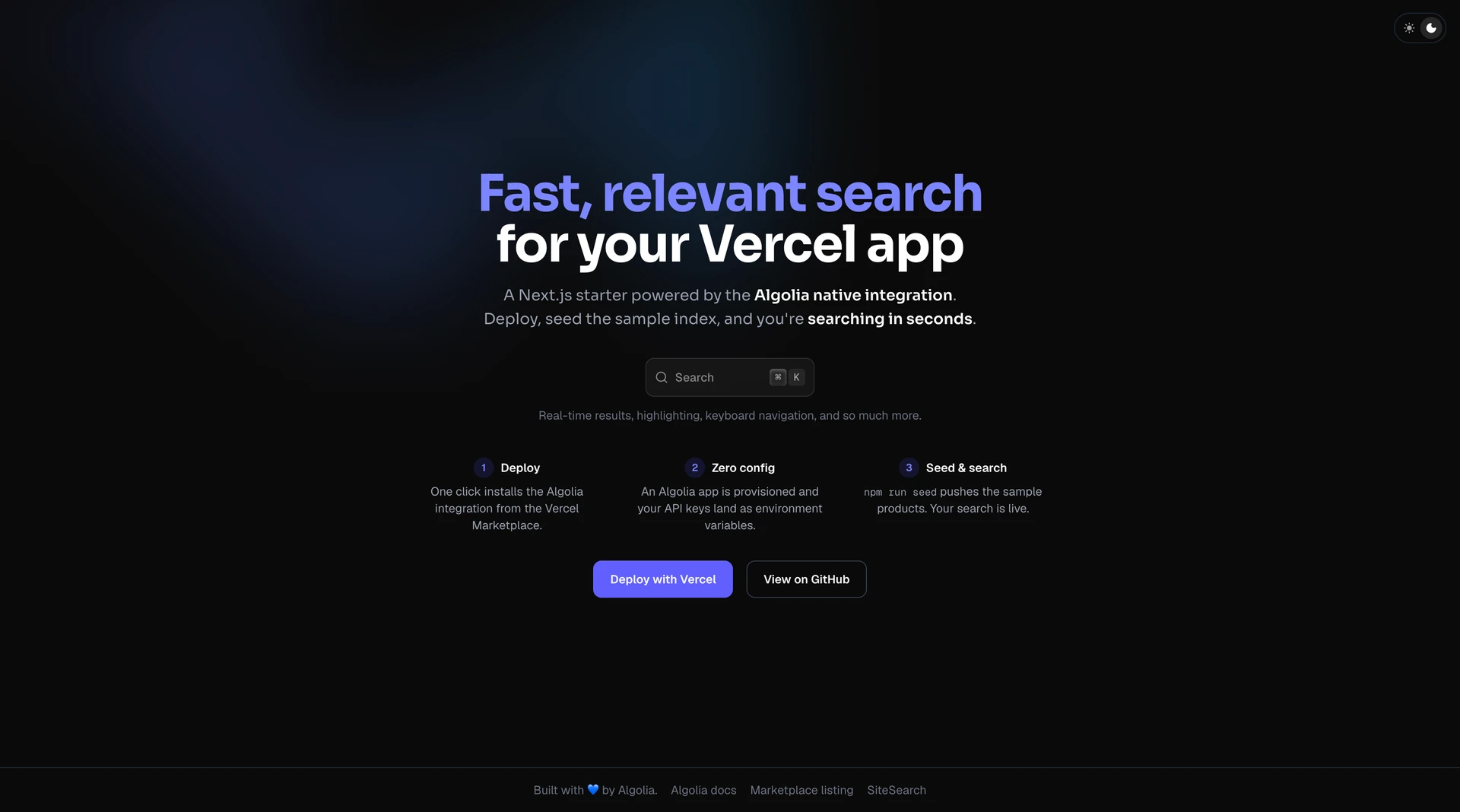
The fastest way to see everything working is our starter template: a minimal Next.js app with a complete search experience, search-as-you-type, highlighting, and keyboard navigation included.
The Deploy button installs the integration on the new project, so the environment variables are there from the first build. Seed the sample products and you have live search in a few seconds!
The starter's UI comes from SiteSearch, a registry of prebuilt search components built on React InstantSearch. If you'd rather not assemble a search UI widget by widget, this is the shortcut: pull in the components and the whole experience comes with them.
If you're wiring the integration into an existing app instead, there's one Next.js-specific detail. Next.js only exposes environment variables to the browser when they're prefixed with NEXT_PUBLIC_, and the injected variables aren't. The starter handles this with a small mapping in next.config.ts:
From there, a search UI is a client component and two widgets:
// components/search.tsx
"use client";

import { liteClient as algoliasearch } from "algoliasearch/lite";
import { InstantSearchNext } from "react-instantsearch-nextjs";
import { SearchBox, Hits } from "react-instantsearch";

const searchClient = algoliasearch(
  process.env.NEXT_PUBLIC_ALGOLIA_APP_ID,
  process.env.NEXT_PUBLIC_ALGOLIA_SEARCH_API_KEY
);

function Hit({ hit }: { hit: { name: string } }) {
  return <article>{hit.name}</article>;
}

export function Search() {
  return (
    <InstantSearchNext indexName="YourIndexName" searchClient={searchClient}>
      <SearchBox />
      <Hits hitComponent={Hit} />
    </InstantSearchNext>
  );
}
That's a working, typo-tolerant search box. For indexing your own data, use the full algoliasearch client with ALGOLIA_WRITE_API_KEY on the server and push records with saveObjects. The starter's seed script does exactly that if you want a reference.
Why we built it
Search used to sit just outside the deploy loop. Your app lived in one dashboard, your search application in another, and credentials made the trip between the two by hand. Not hard, just disconnected.
Making Algolia a native Vercel resource closes that gap. Provisioning, billing, and credentials now live where your project already lives, and adding search to a new app becomes one decision instead of a small setup project.
The Algolia native integration is live on the Vercel Marketplace. Add it to your account today and bring search to your next project, or skip the setup entirely and deploy our starter template in one click!



.webp)














%20(2).svg)