Hosted vs local LLM: a farmer’s guide to cultivating AI infrastructure
Listen to this blog as a podcast:
Recently, a machine learning engineer shared a request that sounded very reasonable:
“Can you help us compare a hosted LLM (OpenAI, Anthropic, etc.) and Mistral models locally?”
It did not stay reasonable for long.
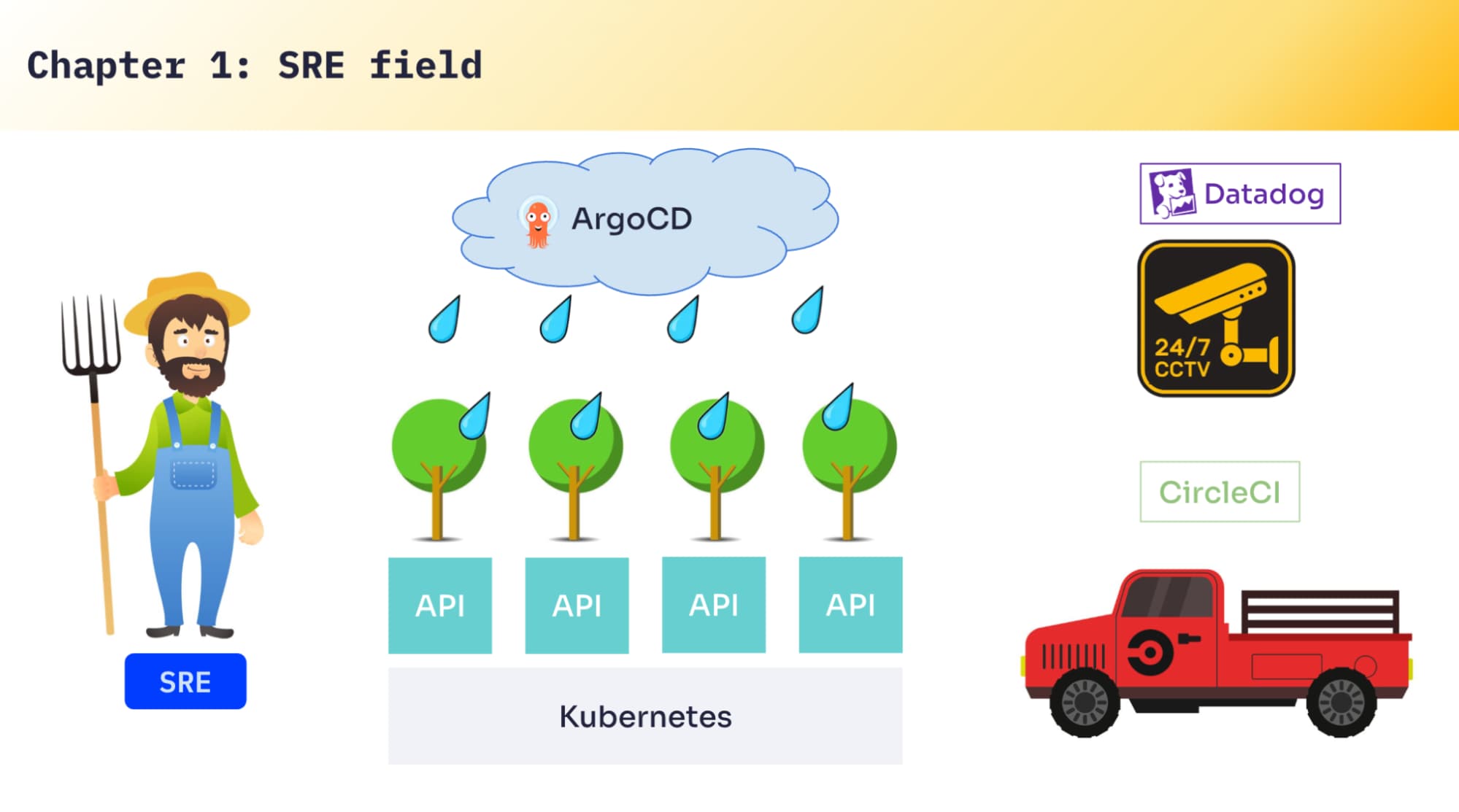
As an SRE, these kinds of questions can often lead to interesting answers. In my original presentation on this topic at Algolia DevCon last year, I used a metaphor (hence the title of this post): that SRE work is somewhat similar to being a farmer where my “field” is Kubernetes. It’s where we grow APIs, ship them to production, and keep them alive. I’ve got a few “trucks,” too: CI/CD to build and deliver, tooling to take care of deployments and recovery, and Datadog as the CCTV cameras so we can monitor everything, collect metrics, and alert when something looks wrong.
In this blog, I’ll walk you through the journey of how we answered the ML engineer’s question, and describe some of the constraints we faced using the metaphor.
If you want to follow along, you can watch the original presentation which is shared at the end of this blog post.
The “simple” request
An ML engineer wanted to compare a hosted LLM with a self-hosted LLM. So I asked the obvious questions: what do you want to compare, exactly? Latency? Relevance? Cost?
His answer was basically: “All of it.”
At that point, I hadn’t really touched LLM infrastructure. So I did what I usually do when I’m missing context: I went to where the engineer was working and had him show me the setup.
He was running on GCP Cloud Run. He had GitHub Actions building everything. And the API was “connected to the sky” — calling OpenAI.
The plan was to add a local model next to that API so we could compare behaviors and performance.
Visiting the LLM market
Because I didn’t understand LLMs well enough, I went shopping first. (By “shopping,” I mean wandering around Hugging Face until things started making sense.)
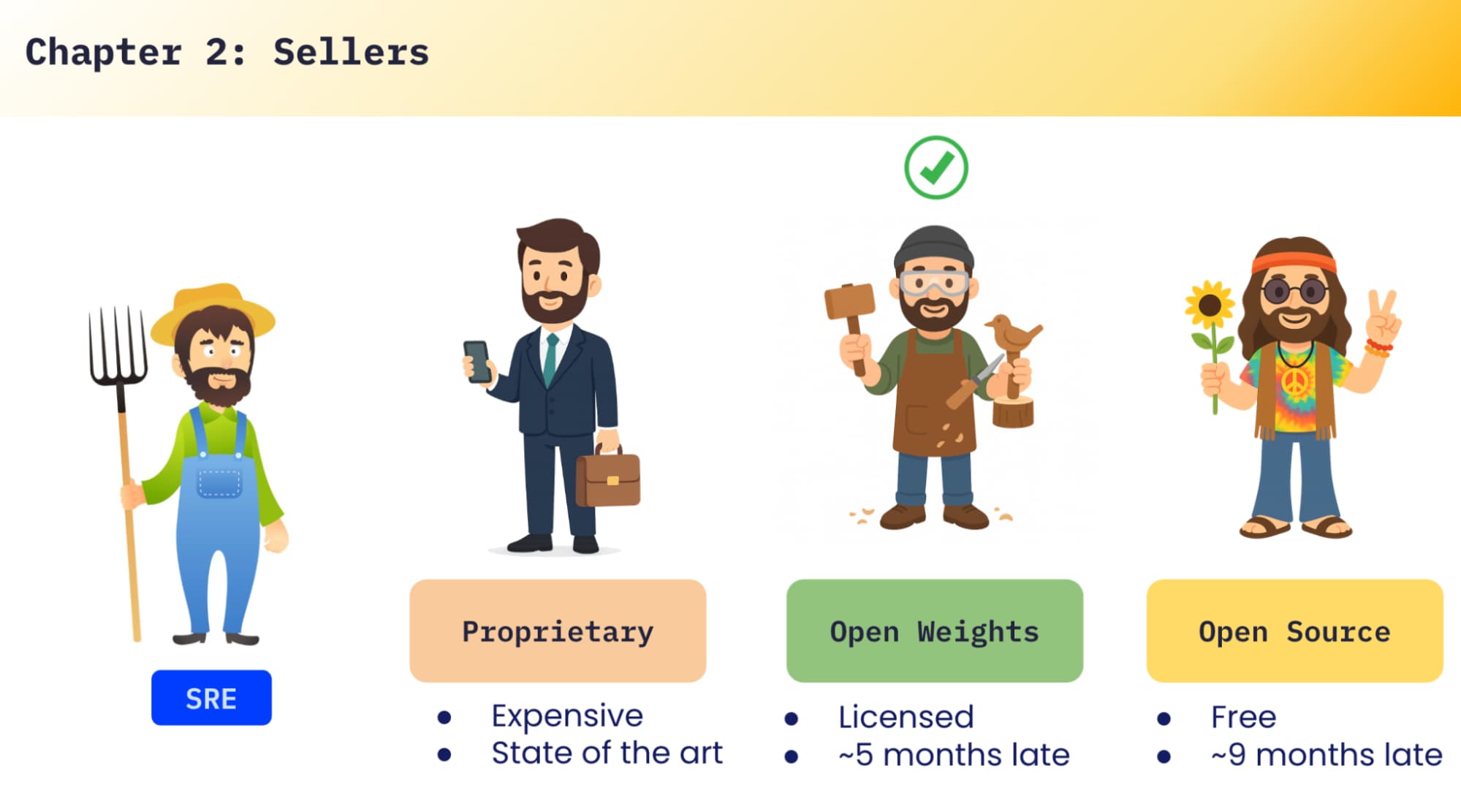
In the LLM market, you’ll see a few categories:
Proprietary models: usually the best quality and newest capabilities, but expensive.
Open-weights models: often strong, but licensed — you have to read the fine print (research-only, restricted usage, and so on). They also tend to lag behind proprietary models.
Fully open models: free, but generally more outdated.
In our case, we chose an option that we could use broadly and safely from a licensing perspective, and we started with Mistral 7B.
Why 7B? Model size is one of the first big decisions. 7B vs 13B vs 60B parameters changes everything: compute needs, latency, cost, operational complexity. We weren’t trying to build a whole platform — we were experimenting — so we started small. We also cared about the non-technical constraints like licensing, where the model came from, and whether we were comfortable with how it was trained (including GDPR-related considerations).
Getting the model to your API: three delivery options
Once you’ve picked a model, the next question is: how does your API actually get it? In practice you usually end up choosing one of three approaches:
Download at runtime: Every time your API starts, it downloads the model. You’ll always pull the latest, but startup time becomes awful.
Store it in a bucket (S3/GCS/etc.): You centralize it, fetch it from storage, and pay for the bucket. Still adds download time on startup.
Bake it into the container image: Your image becomes huge, but once it’s pulled, scaling is fast and predictable.
We went with the container approach. We already had a CI/CD. The thought was: “We’ll just tweak the Dockerfile, build, ship.”
That’s where the first constraint showed up.
Constraint #1: CI disk limits and multi-gigabyte reality
Even the “small” 7B model was around 13GB. GitHub Actions didn’t like that. We hit disk space limits in the CI and the build failed. So we “changed trucks”: instead of building in GitHub Actions, we moved the build step to GCP Cloud Build, which gave us enough headroom to build the image and push it to a registry. Now we had an API container with the model inside. Time to run the first test.
First test: “Hey LLM, what’s your name?”
The ML engineer prepared the simplest possible prompt:
“Hey LLM, what’s your name?”
OpenAI responded in about two seconds.
Our local Mistral container timed out.
We increased the timeout to 30 seconds. Still failed.
We removed the timeout completely. After ~90 seconds, we finally got an answer.
That was a pretty clear message: CPU-only was not going to be fun. We needed to make this faster.
Fertilizer: GPUs (and the “one click” that wasn’t)
The obvious solution was GPUs.
We were lucky: Cloud Run had just introduced GPU support. So we assumed it would be easy — click a button, get a GPU, problem solved.
Next constraint: there were no GPUs available in our region.
We were in europe-west2, and at that time GPU capacity simply wasn’t there. So we tore everything down and recreated it with Terraform in europe-west1, where GPUs were available. Then we ran the same test again.
OpenAI: ~2 seconds.
Local Mistral: ~7 seconds.
Not as fast as OpenAI, but finally in a range where testing didn’t feel painful.
Testing context limits with the CIA World Factbook
Once latency was “good enough,” we moved to a larger test: context size. We used the CIA World Factbook, which is a huge structured dataset: country by country, with sections like history, people, government, economy, geography, energy, and so on. It’s a nice way to test whether a model can ingest a large context and answer questions based on it. The dataset contains roughly two million words.
We gave the model a prompt like: “Can you create a business plan for a new mobile network company in India, specifically for young people?”
OpenAI processed it and responded.
Our local model behaved inconsistently. Sometimes it answered. Sometimes it returned nonsense. Sometimes it didn’t respond at all.
The logs explained it: context exceeded.
Mistral 7B in our setup had an ~8,000 token context limit. When we sent the factbook as context, the model simply truncated it: it kept the prompt and the beginning of the context, and the rest fell off. And you can’t just “toggle” that away. Context length is tied to how the model was trained. That was our first big “local LLM” wall.
Making experiments scalable: review environments for ML engineers
We also wanted multiple ML engineers to test in parallel. We didn’t want everyone sharing one staging endpoint and stepping on each other. We wanted isolated environments: “one API per person,” each with its own endpoint, and automatic cleanup when the work was done. So we built review environments.
The workflow was simple: a developer adds a label to a GitHub PR, and we automatically deploy a duplicate API into staging with a unique endpoint for that PR. When the PR merges, the environment destroys itself and staging updates.
This wasn’t “LLM magic,” but it was essential. If experimentation is painful or risky, people stop experimenting — and then you learn nothing.
Constraint #2: legal and licensing isn’t optional
At some point, I saw news about a newly released model and got excited. I created a new config and was ready to ship it to staging. However, our Legal team stepped in at this point. They were right to do so.
Everytime a new model shows up, we need to understand:
the license and usage restrictions
where it was trained and how it was trained
whether we’re comfortable from a GDPR and compliance perspective
bias considerations
The takeaway for me: don’t treat model upgrades like bumping a library version. It’s closer to adopting a new dependency that comes with legal and reputational risk.
Where we landed after a few months
After months of experimenting, the picture became much clearer. We had:
Stability issues: the local model sometimes wouldn’t answer, or would crash (out-of-memory was a recurring theme).
Hard context limits: large-context tests exposed a real capability gap.
Update friction: our CI/CD wasn’t running daily to refresh models, so we were often behind and upgrades were painful.
Latency gaps: even with GPUs, OpenAI was ~2 seconds in our baseline tests; local was more like ~6–7 seconds without significant optimization work.
At some point I realized: to “fix it properly,” I’d need to duplicate myself. What began as a single request was turning into a platform investment. So we had to make an explicit choice: do we invest seriously in local hosting, or do we use a proprietary model for this stage and focus on product logic?
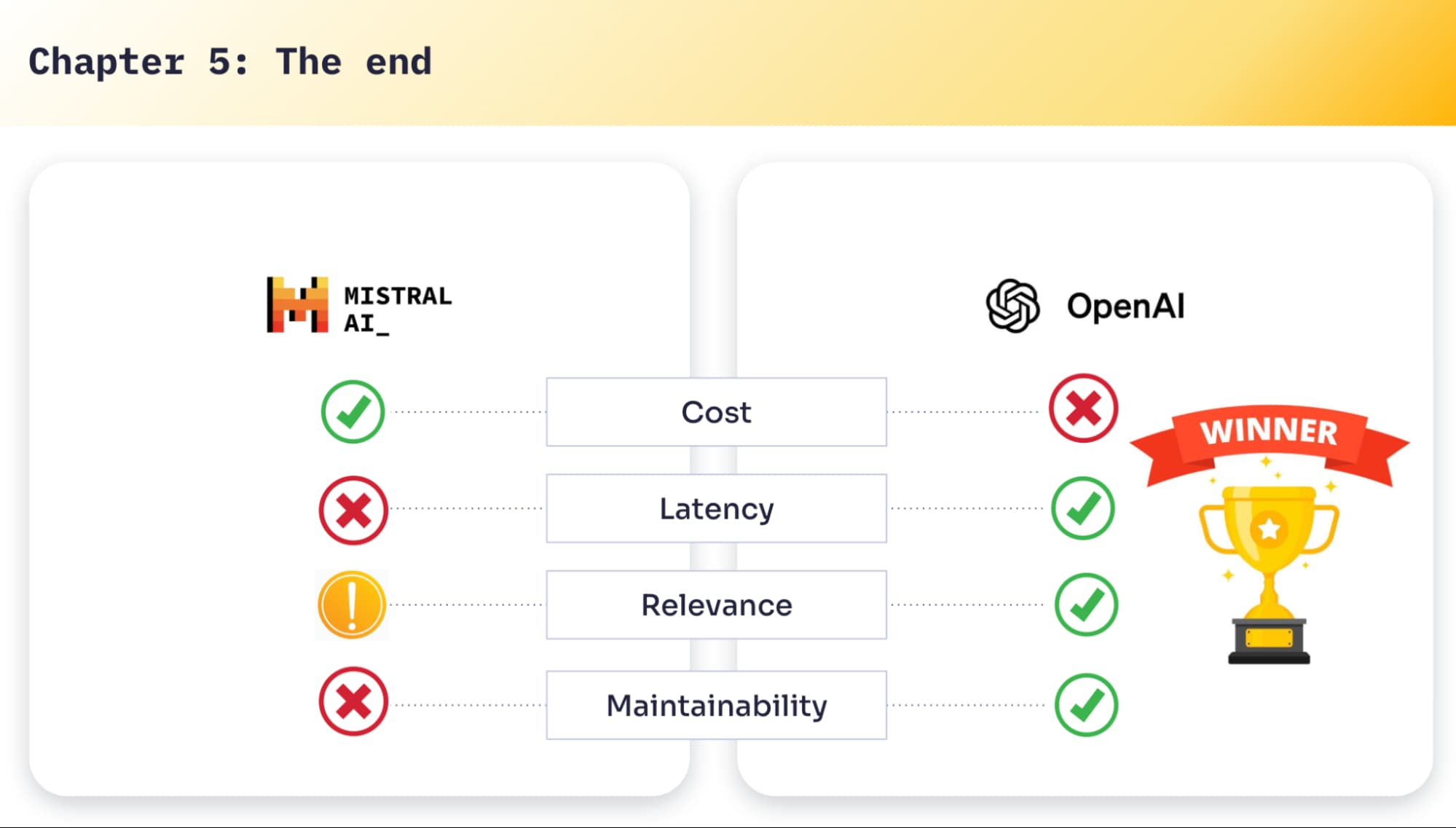
A summary of how I compare local vs proprietary now
Here’s the practical version of the tradeoff.
Cost
Proprietary: pay per token / request. Easy to start, easy to scale up, and it can get expensive.
Local: you pay for infrastructure. You can keep it cheap on CPU (slow), or invest in GPUs to chase performance.
Latency
Proprietary wins out of the box.
Local can get close, but you’ll spend time on optimization, hardware choices, and operational tuning.
Relevance and context
Proprietary models tend to support larger context windows and handle long inputs more gracefully.
Local models can do great work, but the context window is a hard constraint unless you design around it (retrieval, chunking, summarization, fine-tuning, etc.).
Maintainability
Local requires real operational ownership: GPUs, runtime behavior, memory pressure, upgrades, monitoring, fallbacks.
Proprietary is a black box — but the developer experience is clean: you integrate, you pay, it works.
The main lesson: embrace constraints instead of fighting them
We started this thinking “it’s just one click to add a GPU powered LLM.”
We ended up learning about disk limits, multi-gigabyte builds, regional GPU availability, context window constraints, instability, model update workflows, and licensing/compliance reality.None of those issues are “hard” individually. But they stack — and that stack is what AI infrastructure really is.
If you don’t have a team ready to invest, and you mainly want to experiment quickly and focus on your application logic, proprietary models are a great option. However, if you want control, deep understanding, and the ability to tune or train over time — and you’re ready to cultivate that field — local models are a strong path.
That’s the journey I didn’t expect when someone asked, “Can you help us compare OpenAI and a local LLM?”



.webp)










.avif)

%20(2).svg)