TL;DR: Algolia's Visual Editor now supports pin blocks — a smarter way to pin products that keeps your curation intact even when items go out of stock or get filtered out.
Search has come a long way. Ranking algorithms, personalisation, AI-powered relevance — today's tools do a remarkable job of surfacing the right products without manual intervention. But even with all of that, there are moments when merchandisers need direct control. A seasonal hero product. A brand partnership. A strategic promotion. These aren't decisions you want left to an algorithm — you want them pinned, front and centre, exactly where you put them.
But inventory never stands still. Products go out of stock, get filtered out, disappear from the index. And every time that happened, Algolia quietly filled the vacant slot with an organic result, breaking the carefully crafted order you'd built. What should have been effortless suddenly required vigilance.
The worst part? There was no alert. No notification. Just a gap, sitting in your storefront, invisible until someone spotted it. That meant merchandisers had to manually check their curations — regularly — to make sure nothing had slipped. For teams managing hundreds of rules across multiple categories, that's not a minor inconvenience. It's a constant background task, eating into time that should be spent on strategy, not firefighting. And for high-turnover categories like grocery, where stock changes daily, the problem compounds fast: you'd fix a gap today and find three more tomorrow. There was no ease to it — just grind.
That's exactly the pain we set out to fix. Today, we're introducing pin blocks.
Pin Blocks put merchandiser at ease: One toggle, no more gap-checking
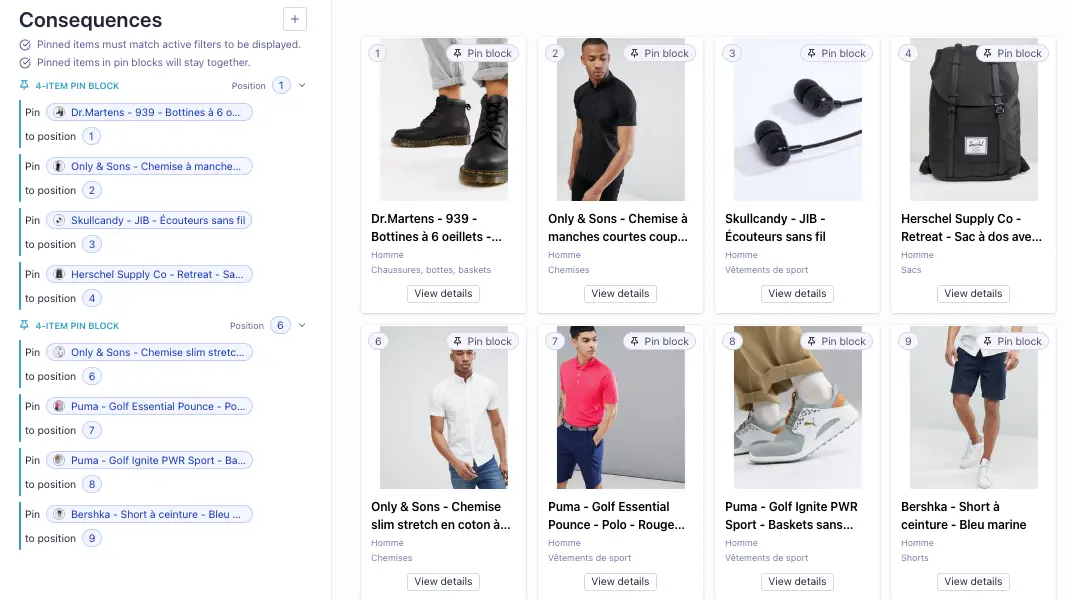
A pin block is a group of contiguous pinned items that stay together. When you enable the "Shift pins to close gaps" toggle on a rule in the Visual Editor, adjacent pins form a block. If any item in that block becomes unavailable — out of stock, filtered out, or removed from the index — the remaining items shift up automatically to fill the gap. No organic results sneaking in. No holes in your curation.
One toggle. That's it. We designed pin blocks to slot seamlessly into the way you already work — no new concepts, no changes to how you pin today, just effortless behaviour under the hood.
Simple to set up, effortless to run
Once the toggle is enabled, any contiguous pinned positions in your rule form a pin block. You can have one big block or several smaller ones — just leave an unpinned position between them to keep them separate. The start position of each block is editable, and the feature is fully backwards-compatible: it's off by default on existing rules, so nothing changes unless you choose to enable it. Straightforward by design.
Built for the way merchandisers actually work
"We're finding it super helpful. We're seeing it shift the product perfectly." -Merchandiser from major luxury brand.
At Algolia, we're on a mission to make merchandising easy. Pin blocks are a good example of that in practice — a small, frictionless change in the UI that eliminates a whole category of manual work, so your team can focus on the curations that drive results, not the ones that have quietly broken.
Your curations are only as good as the confidence you have in them. With pin blocks, that confidence comes effortlessly — built in, not bolted on.



.webp)













%20(2).svg)