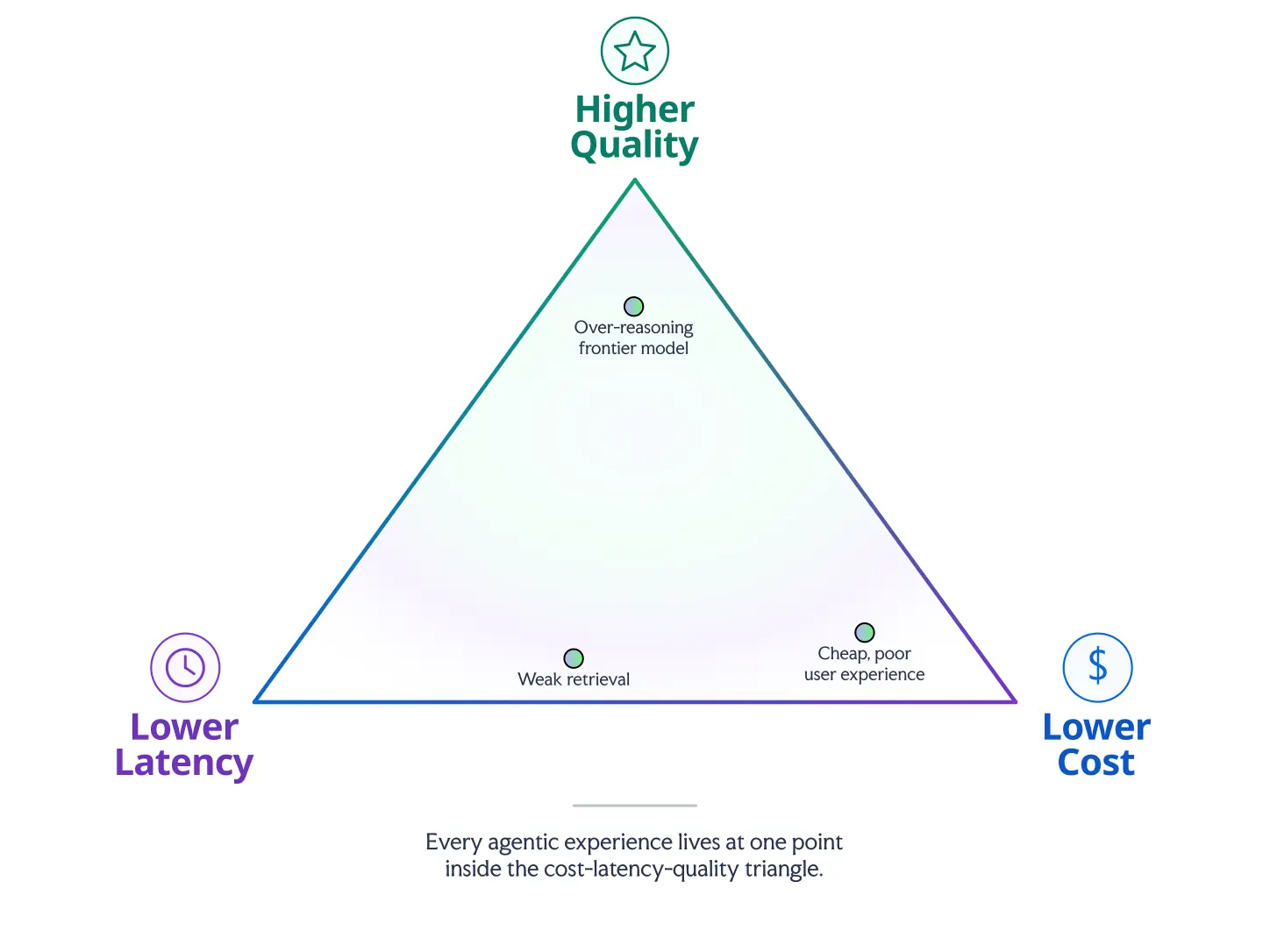
Agents make for impressive demos. A team can get all the way to launch convinced they’ve built something incredible — only to watch it strain under real traffic on day two. Why is that? It’s because production traffic exposes the tradeoffs between cost, latency, and quality. Every agentic feature sits somewhere on that triangle:
Ultimately, these goals tug us in opposite directions:
Cost is an economics and ROI problem.
Latency is a UX and abandonment problem.
Quality is a retrieval accuracy and orchestration problem.
Push too hard toward one goal and you usually give something up somewhere else without careful optimization.
Instead of asking “Which model is best?”, we should really be asking ourselves this:
Which agentic experience will deliver the best ROI, respond before our users lose patience, and produce useful answers from reliable retrieval?
In this article, we’ll figure out how to answer that thorny question, discover why a model’s per-token price doesn’t tell the full story, how retrieval can make or break an agent, and how Agent Studio helps teams manage these tradeoffs in production.
Token list price doesn’t tell the full story
We tested every major LLM on real shopping queries and recorded the results in our new LLM Leaderboard. One of the key metrics we tracked is obviously the LLM cost per token, but there are several ways that your final ROI might not reflect those exact numbers:
High-reasoning models use more tokens.Claude Opus 4.6 and 4.7 supposedly cost around 20x as much per token as Gemini 3.1 Flash-Lite, but in our tests, Opus used so many more tokens in reasoning and retrieval operations that the difference ended up being more like 416x ($0.832 per query with Opus vs. $0.002 per query with Gemini Flash).
Hallucination-prone models add friction. Running the query “What is the cost per ounce if I buy the set of 6 stainless steel double wall espresso cups?” on Grok 4.1 Fast hallucinated certain product features that don’t exist in the catalog it was searching, like claiming some cups have handles or are stackable, and that others are out of stock. This creates more friction between search and checkout and reduces the likelihood of a sale, not to mention the increased token usage caused by follow-up questions resending the entire conversation context over and over.
Low-quality models need more scaffolding. Our leaderboard helps us compare objectively because the models all used the same Agent Studio harness, the same catalog and access tools, and the same system prompts. GPT 5 Nano returned significantly more relevant results that GPT 4.1 Nano (95.2% vs. 73.8%), so we can assume that trying to get GPT 4.1 Nano to work to the same level would require a lot more careful prompt tuning and scaffolding — all of which costs time and money — plus the system would be more brittle and prone to unexpected errors.
All of this is agentic overhead: the complexity that isn’t obvious in isolation but becomes unavoidable when we use the LLM in an agentic context. Because of this overhead, it’s not as beneficial as we might expect to judge models solely on their per-token price. Choosing the wrong model, even if its per-token price is rather low, could end up costing more money than it’s worth. This is especially true in high-volume ecommerce and content discovery.
Really, instead of measuring what the model itself costs in isolation, we should measure what the whole shopper interaction costs in production, as opposed to the expected value we’ll get out of that interaction.
Search ROI depends on the value of the interaction
An agentic query is cheap or expensive only relative to the value it creates. A five-cent interaction may be wasteful in a low-AOV, low-margin category where the user only needs a basic filter or keyword search, but that same five-cent interaction may be a bargain if it helps a shopper compare high-ticket products, qualify a complex B2B purchase, or avoid calling support.
A great way to measure this in an ecommerce context is comparing your average agent interaction cost per search-to-checkout session against your average order value and margin. This ties model selection to business outcomes, not technical benchmarks. You could also figure out the agent’s impact on your chosen business outcome by asking if the agent:
generates more money than it spends in general, not just per order
improves our conversion rates, creating sales that wouldn’t have otherwise gone through
reduces support tickets or automatically resolves them
Higher-cost, slower reasoning models are easier to justify when the decision is complex, high-value, or high-risk. So for an agent designed around support or enterprise buying journeys, the end user might have a little more patience for slow reasoning models, and we’ll see that reflected in our KPIs. But try the same model for a less specialized ecommerce site with basic filters and lower margins, and your users may click off before the agent’s response even streams in.
Since a full site might use agents for several tasks, we can get even more specific by measuring the value and complexity of each individual task and matching each one to its own suitable model. For example:
Small, fast models for intent classification, query rewriting, filter extraction, routing, and lightweight personalization.
Mid-tier models for grounded answer generation, simple recommendations, summarizing retrieved results, and explaining differences between a small set of options.
Frontier or reasoning models for complex comparisons, ambiguous multi-step research, high-value purchase decisions, B2B discovery, and final synthesis when the answer materially affects business value.
The rule of thumb: use the least expensive model that can reliably do the job. Upgrade where you need to for quality results and premium UX, but otherwise avoid spending frontier-model money on steps where speed and consistency matter more than deep reasoning. You can figure out where that line is by trying out different models and looking for where an upgrade significantly moves the needle on one of your key metrics, like conversion, support ticket resolution, or order value.
The point here: the wrong model doesn’t just wind up costing us some R&D budget. It can affect our company’s overall margins and user experience in unpredictable, cascading ways. The right model for a given task is the one whose cost is justified by the value it generates at that task.
Latency is an abandonment problem
Humans have short attention spans, especially online. So when we’re building agentic features, latency is a dealbreaker since it directly determines whether users will stay in the experience we’ve designed. If they lose their patience, we lose the sale.
At their core, LLMs are unimaginably massive and complex statistical analysis programs. It’s no wonder that sometimes they’re slow. Depending on how they’re trained, some might be more verbose than others. Some models are built to reason internally before producing a user-facing answer; some use the retrieval tools at their disposal more judiciously than others. All of these designs change how much latency you can expect from a given model specifically in your agentic system, since they could easily pass muster in another context with different tools, but not in your context with your tools.
It’s also important to distinguish Time to First Token (TTFT) from full end-to-end latency. Streaming models are optimized to start returning tokens immediately to improve the quality of the wait. That means that a model like the high reasoning version of Grok 3 mini might start returning data in half a second, but take 30-60 seconds to get through the whole answer. Compare that to Gemini 3.5 Flash, which might technically start returning data a few hundred milliseconds later, but finishes up within three or four seconds. These metrics translate to different aspects of the user experience — TTFT determines if the user sees immediate feedback that something is happening, full end-to-end latency determines how much of the user’s total patience we take up. In this case, the fraction of a second difference in TTFT isn’t worth the slowness of Grok 3’s full output, so assuming quality is comparable, the better option would be Gemini 3.5 Flash.
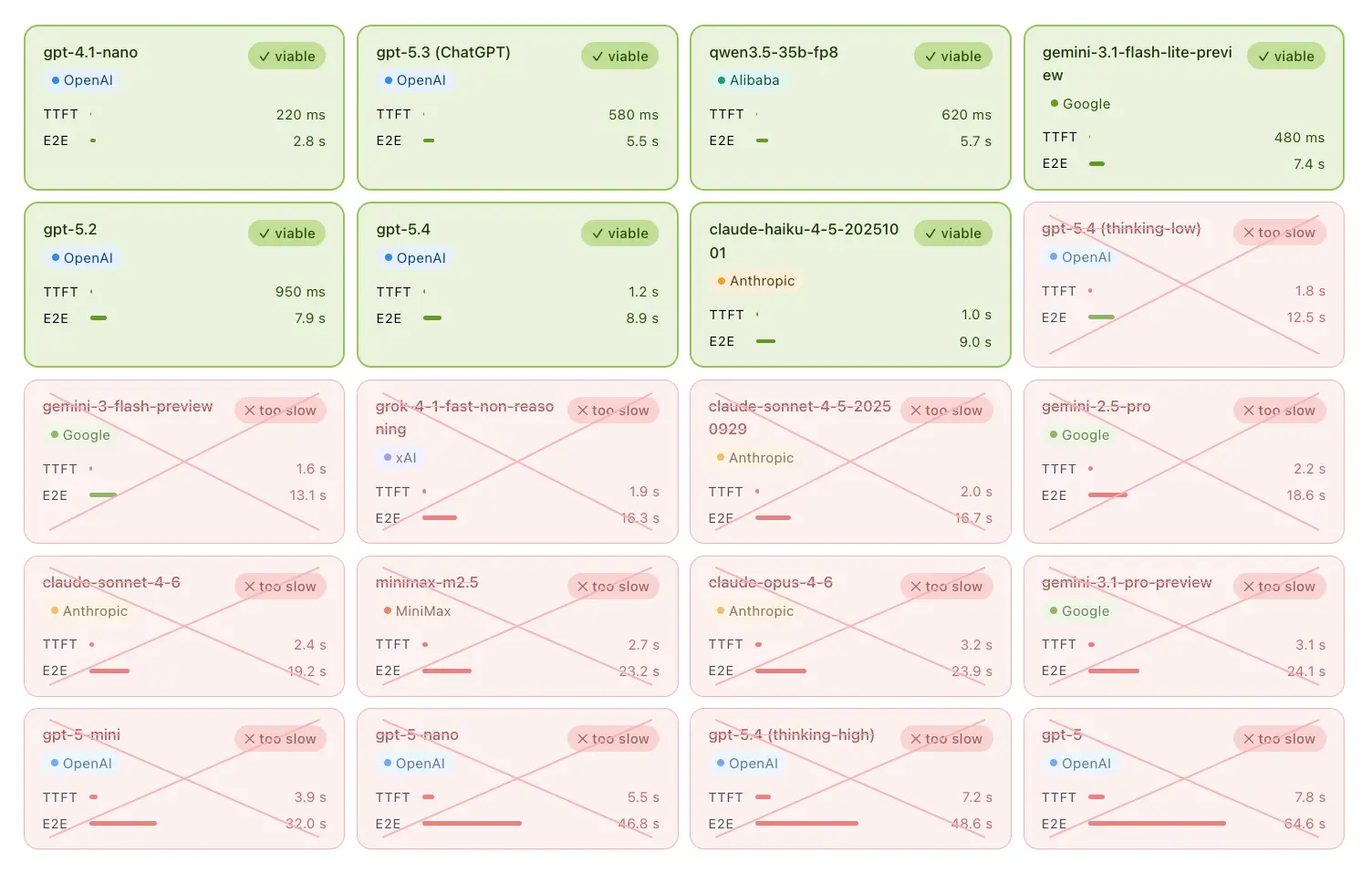
So how does this play into model choice? We will have to do some testing eventually, but latency metrics let us narrow down the field of choices considerably before we even get to that point. A one-minute answer may work for some internal workflows that need high reasoning capabilities, but that’s usually unacceptable for customer-facing ecommerce or discovery. Users will click the back button, return to normal search, or abandon the site altogether. In a use case like that, we can define the thresholds for what latencies we would accept and rule out the models which clearly exceed them:
This is an example model shortlist from May 2026 after removing options that exceed a target latency threshold. Results will vary by use case, workflow, and available models.
Now you only have seven models to test instead of 20. Perhaps only a few of those will be capable of the relevance, quality, and consistency you’re expecting, so you might actually only have to test two or three models in your workflow. Tools like Agent Studio can make this comparison easier by letting teams test the same workflow across different providers, but the underlying principle is that latency should narrow the model set before deeper quality testing begins.
Retrieval has to give the agent time and grounding
Retrieval affects all three directions of the triangle: latency, quality, and cost. To optimize in all of those directions at once, you need a retrieval system that works incredibly fast, compensates for imprecise queries, and deeply understands your product catalog, all without making each interaction too expensive. Fast, consistently relevant retrieval creates room for the agent to reason, synthesize, and respond without introducing significant latency or quality regressions.
In agentic search, the model is only as useful as the context it gets. Great retrieval reduces the risk of hallucinations and makes sure the model doesn’t just ramble, but put the user’s attention on entries from your product catalog. It’s also precise, returning just enough information to ground the model’s responses without overloading the model’s context window. That lets you use smaller or faster models, reducing cost and latency while improving quality. Ultimately, agentic performance depends heavily on how well your retrieval system works with your model. That retrieval layer isn’t background infrastructure; it directly drives UX and ROI.
Agent Studio lets you test the system, not just the model
If agentic performance depends on how well the model works with retrieval, then you need more than API plumbing. Agent Studio lets you test the whole workflow: model choice, prompts, retrieval behavior, tool use, latency, answer quality, and business impact.
To be blunt, we don’t care which model gives the “best answer”. That’s not specific enough to be useful. We care about which configuration produces enough quality, fast enough, and at a cost the business can sustain. That means that across all of our potential model choices, you’ll be measuring:
agent cost per checkout session, to understand the ROI on agentic features and which cohorts of shoppers tend to use AI tools, and
impact on shopper behavior as understood through changes to KPIs.
These tell us roughly where we are on the cost-quality-latency triangle and what needs to be improved to hit our goals.
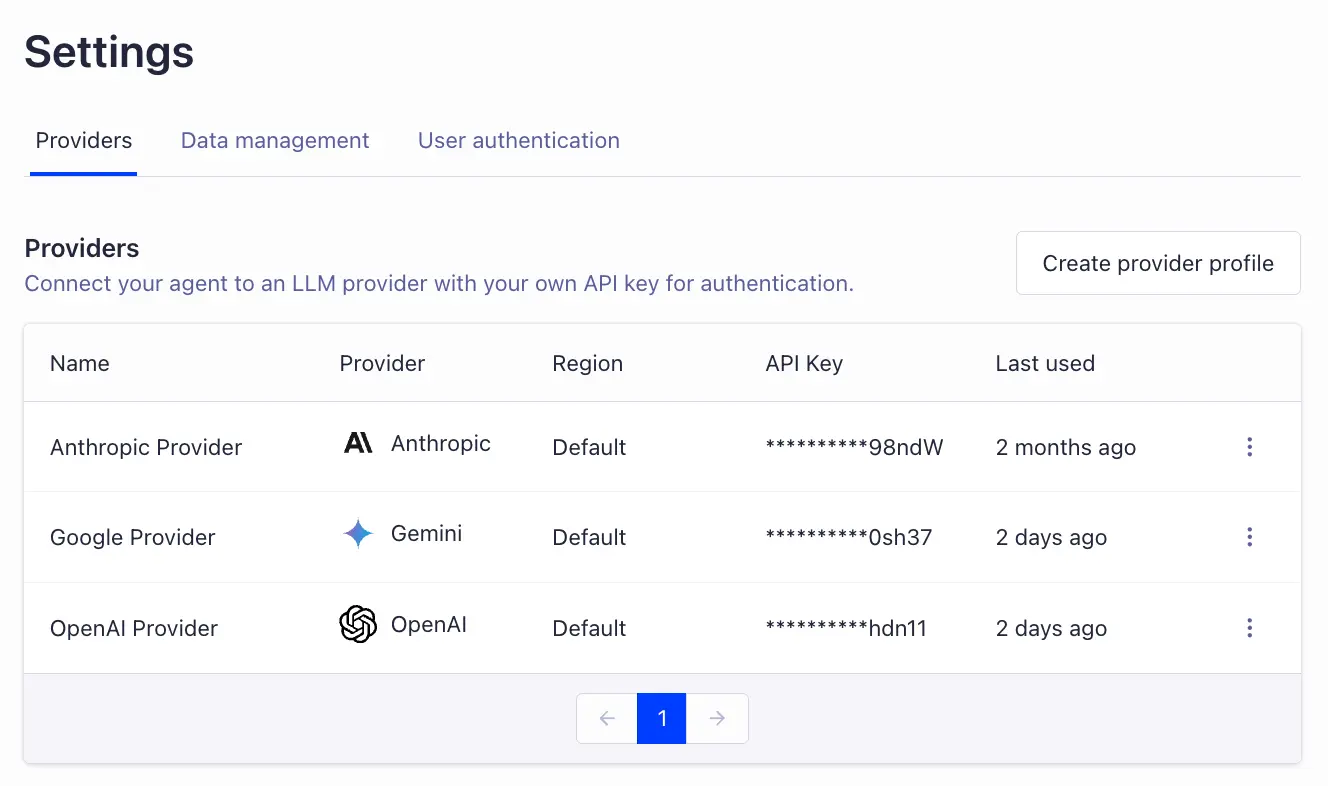
Switching out models while keeping the system and infrastructure is straightforward in Agent Studio. We can just create Providers in our Settings page, one for each API key:
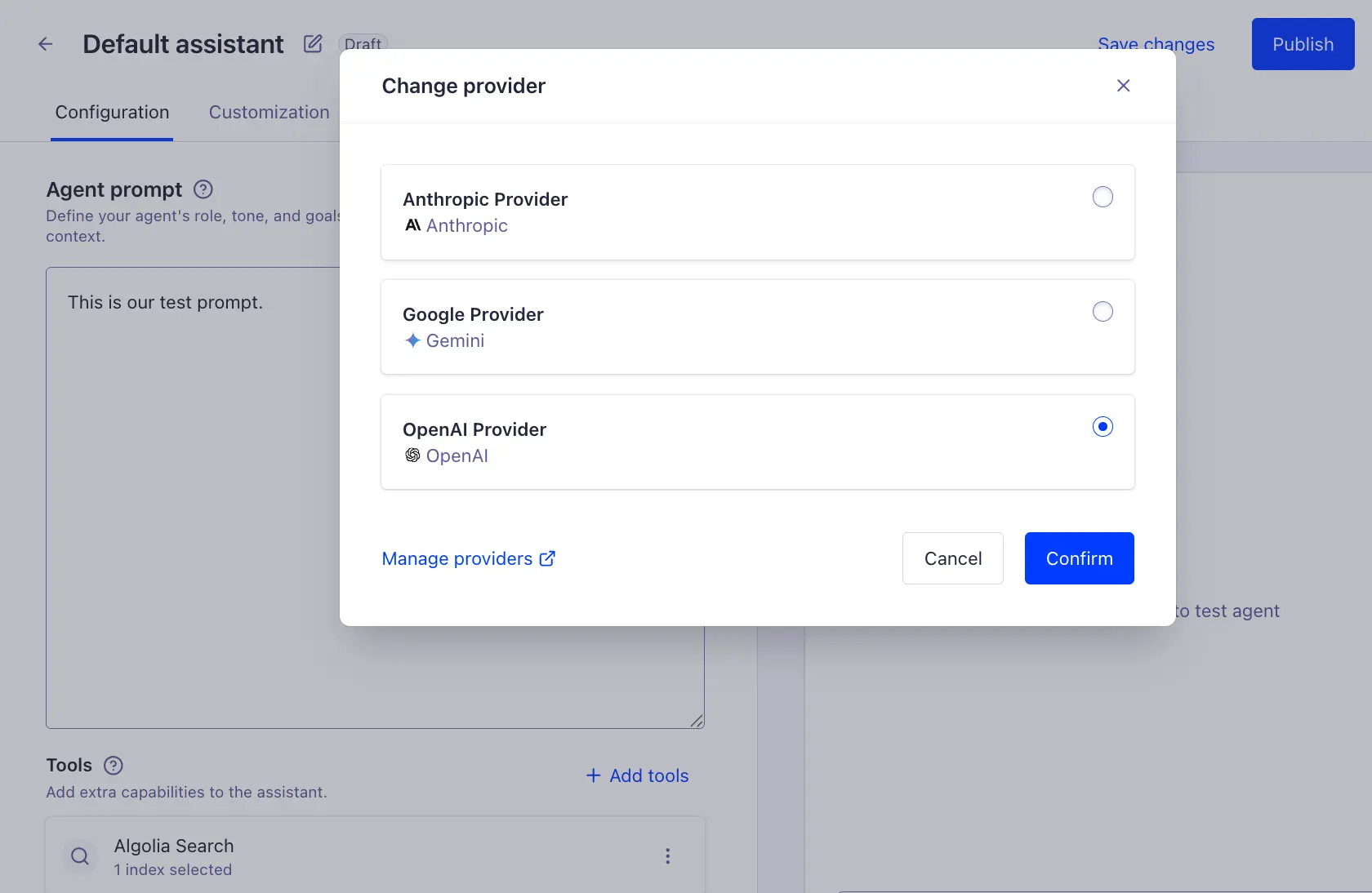
Then in our agent definition, we can just select one of our providers:
Hook it up to your real product catalog with the Algolia Search tool, and any other tools your agentic system might need. Then, run tests that closely match what the agent would experience in production and measure how it performs. For comparison, just switch the provider your agent uses and run the same tests again. While you should measure and compare the first-level measurements like token usage, tool calls, retrieved content, TTFT, total latency, answer quality, the real “aha” moment is going to come from comparing business outcomes like conversion, abandonment, support deflection, or lead quality.
The right agent is the one the business can run
The goal is not to use the most impressive model. The goal is to build an agentic search experience that works under real production conditions. That means the cost has to make sense given the revenue it creates, latency has to stay below the user’s frustration threshold, and quality has to come from accurate retrieval, grounded answers, and efficient orchestration.
Agent Studio gives teams a practical control layer for managing all the decisions that go into that across model behavior, Algolia retrieval, and orchestration. As models change and user behavior evolves, Agent Studio gives you a way to keep tuning the agentic search loop instead of locking yourself into one model choice and hoping it scales. Agent Studio is available across Algolia plans, so you can start testing the full agentic search loop today: model behavior, Algolia retrieval, orchestration, latency, quality, and cost.



.webp)













%20(2).svg)