DocSearch reimagined: modern UI + conversational AI
Listen to this blog as a podcast:
Algolia DocSearch is a free service designed to add fast search capabilities to developer documentation websites like React, Homebrew, Tailwind, TypeScript, Twilio, and Chromium Developers. DocSearch is celebrating its 10th anniversary and we decided this was a perfect time for a glow-up, both in functionality and appearance. Version 4 isn’t just a coat of paint — it’s a rethink of how developers actually expect search to work in 2025.
DocSearch v4 — Ask your docs, get real answers.
A modernized UI
In v4, everything about the user experience has been rethought. Now, there’s softer visual styling, rounded and modern icons, smoother animations, and a design that feels at home in today’s professional-looking technical docs sites. Now it’s not just mobile-responsive, but mobile-first, so tapping and swiping through results feels more like the intention than an afterthought. Power users don’t lose anything either, since the beloved keyboard shortcut ⌘K still works exactly as before.
Search and AI-powered chat — you pick
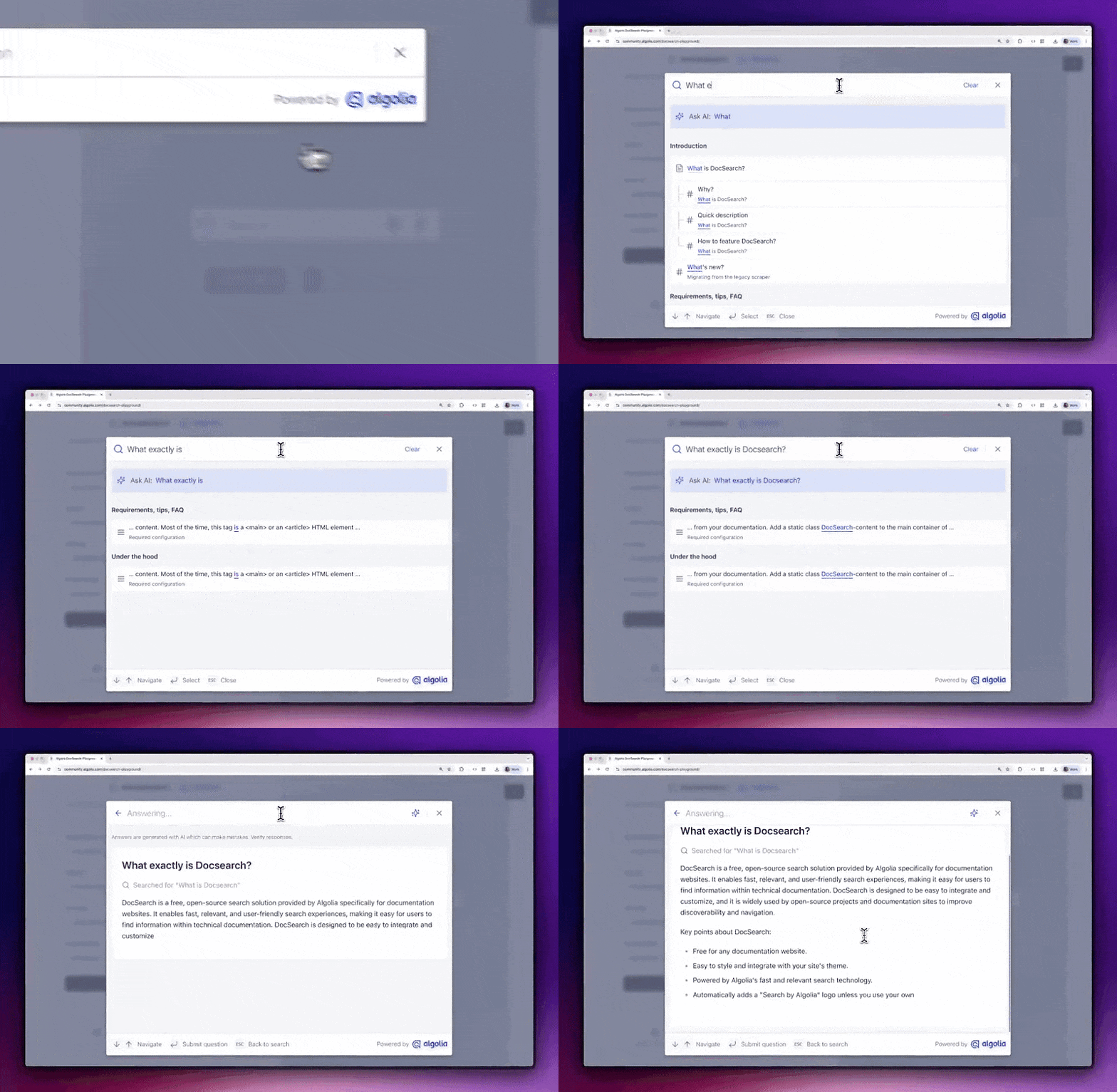
Your users are developers at the forefront of modern technology — they’re expecting intuitive, smooth integration between search with citations and conversational AI. In DocSearch v4, users can instantly switch between as-you-type keyword search and a conversational assistant mode we’re calling Ask AI. The transition is seamless: results flow smoothly into an AI-generated answer, complete with source citations so users can see exactly where the answer came from. Ask AI also lets the searchers follow up with their questions, digging deeper into a topic in a natural Q&A flow. This docs-as-dialogue approach means fewer frustrated developers bouncing to support tickets, and more questions answered directly inside the docs.
A wider ecosystem
Under the hood, it’s still Algolia — it always has been. Our best-in-class search infrastructure is known for guaranteeing up to 99.999% uptime and powering over a trillion queries every year, and it comes with straightforward APIs, SDKs, and frontend UI libraries for free. Version 4 still runs on Algolia’s enterprise-grade crawler and indexing engine, with templates tailored for the quirks of documentation sites, like headings, nested menus, versioning, and code snippets. Those fundamentals haven’t changed. But now, DocSearch builds on top of that whole ecosystem of features, making for a smoother transition from “search for docs” to “search for everything” with a full Algolia account as your needs change.
A pipeline built specifically for your use case - no more jerry-rigging
Why DocSearch matters
If developers can’t find answers quickly, they churn. Whether it’s a simple “how do I” or a more advanced debugging question, a little help goes a long ways towards reducing support tickets and repetitive forum posts. Docs search done right isn’t a nice-to-have — it might be the difference between a user getting started today or giving up altogether.
Help your users stay in the zone and build with your product without context switching. DocSearch directly contributes to DX because continuous focus leads to quicker time-to-value.
For example, DocSearch and Ask AI have improved the DX at Magnolia CMS. Take a look at what their Technical Documentation Manager Alex M. said:
Setting up Algolia's Ask AI was incredibly easy and intuitive by simply copying/pasting a code snippet and going 'live'. The assistant delivers reliable answers, and it's exciting to see it gradually becoming a helpful 'persona' alongside our documentation. The UI is straightforward, and while we're exploring ways to fine-tune results and expand widget integration, Ask AI is already proving to be a powerful and user-friendly tool for enhancing our search experience.
Adding value to the world
Algolia has a mission to help developers put their data in motion. DocSearch is how we’re going all in on the developer community — free, production-ready search for your docs and blogs. We add value to the world by empowering you to.
If that piques your interest, you can sign up and get your eligibility automatically verified within minutes right now on the DocSearch signup page.



.webp)












%20(2).svg)